 Top Lists for USA
How To Connect Fusion Markets to MT5
Fusion Markets supports MetaTrader 5 (MT5). To connect, you first need to create the right account in the Client Hub, then log in. One thing people often miss is that each platform needs its own trading account. You can’t use an existing cTrader or TradingView account from Fusion for MT5. Here’s the process we used on our own account.
 Written By
Christian Harris
Christian is a seasoned analyst, leveraging his expertise in stocks, forex, and crypto to evaluate brokers worldwide. With hands-on trading experience and a strong focus on risk management, he helps traders find reliable platforms. Christian's work for BrokerListings.com has been cited in the Financial Times.
Christian Harris Profile Page Fact Checked By
Tobias Robinson
Tobias is committed to helping traders find the right brokerage for their needs. He has tested 200+ brokers, spent 2,600+ hours using different platforms, and placed 2,100+ trades.
Tobias Robinson Profile Page Edited By
James Barra
James is an experienced broker analyst with a background in financial services. He has spent 2,500+ hours testing brokers, used 35+ different platforms and apps, audited 120+ broker T&Cs, and verified 300+ regulatory licenses. James has also been on US and UK TV, and been a guest on finance podcasts, discussing reports conducted by BrokerListings.com and sharing his expertise.
James Barra Profile PageOctober 7, 2026
Step-By-Step
- Log in to the Client Hub. Sign in at the Fusion Markets website using the email and password from your registration.
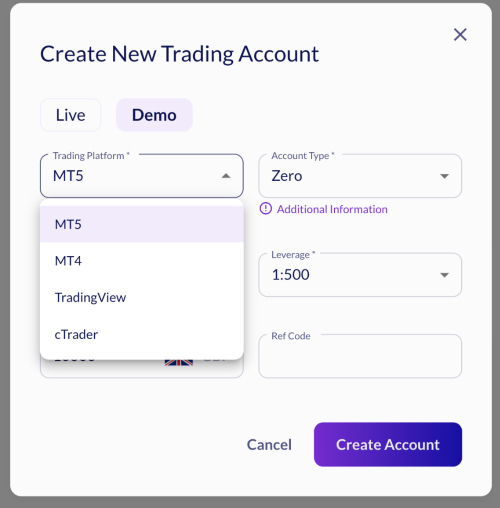
Create a new live (or demo) account. Go to the Trading Accounts area and choose to open a new account. Select MT5 as the trading platform. Also, pick your account type (Classic or Zero), base currency, leverage, and deposit amount. - Save your credentials. Once the account is created, Fusion Markets emails you three important things: a login number, a password, and a server name. You need all three. We’d suggest copying them to a safe location before moving on.
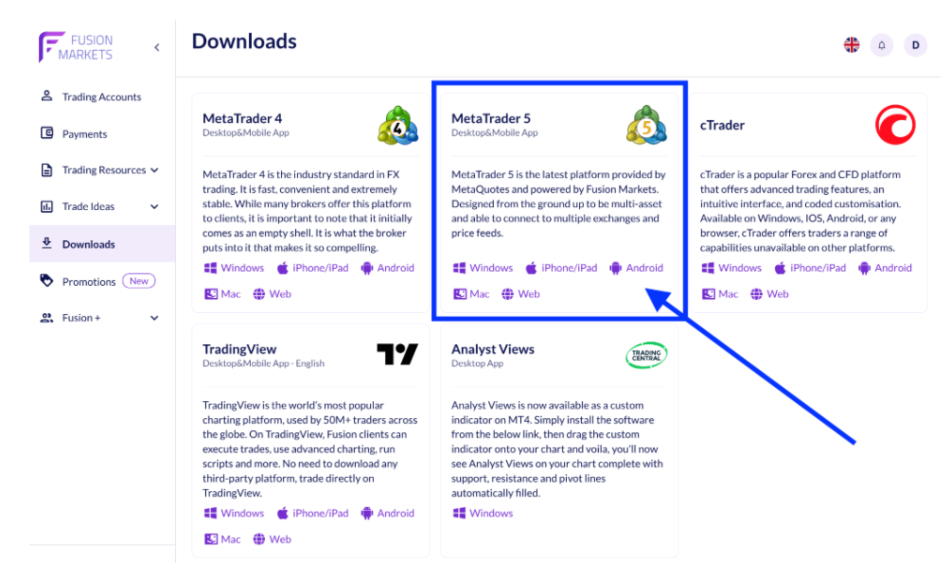
- Download MetaTrader 5. Get the platform from the Fusion Markets site or the official MetaQuotes download for desktop, iOS, or Android. Install and open it.
- Open the login screen. In the desktop app, go to File > Login to Trade Account. On Fusion mobile, tap Account settings, then choose to connect an existing account.
- Search for the server. Enter the Fusion Markets server name from your email into MT5’s search box and select it. Logging in fails most often because of a wrong server name, so make sure it matches exactly.
- Enter your login and password and connect. Use the MT5 login number and password from the email. A successful connection shows live prices and your account balance in the bottom corner.
If you open a Classic account and later try to use cTrader, it won’t work because cTrader uses a commission-based pricing model that Classic doesn’t support. MT5 works with both account types. If your password doesn’t work, reset it in the Fusion Markets Client Hub, not in the MT5 app, since the Hub is where your credentials are managed.