
Best Mobile Trading Apps 2026
After rigorously testing a wide range of Android and iOS mobile trading apps, we’ve identified the brokers with the best mobile platforms in October 2026.
 Written By
Paul Holmes
With over 15 years of trading experience, including developing algorithmic strategies on MetaTrader and evaluating brokers, he brings deep expertise in market analysis and trader education, helping traders choose the right platform for their requirements.
Paul Holmes Profile Page Fact Checked By
Tobias Robinson
Tobias is committed to helping traders find the right brokerage for their needs. He has tested 200+ brokers, spent 2,600+ hours using different platforms, and placed 2,100+ trades.
Tobias Robinson Profile Page Edited By
James Barra
James is an experienced broker analyst with a background in financial services. He has spent 2,500+ hours testing brokers, used 35+ different platforms and apps, audited 120+ broker T&Cs, and verified 300+ regulatory licenses. James has also been on US and UK TV, and been a guest on finance podcasts, discussing reports conducted by BrokerListings.com and sharing his expertise.
James Barra Profile PageAugust 18, 2026
-
1
The IBKR Mobile app for iOS and Android allows you to access your IBKR accounts, monitor portfolios, execute trades, and view real-time quotes and charts. Its user-friendly design is ideal for new traders, offering a simpler experience compared to the more complex TWS platform.
Interactive Brokers Trading Apps
Interactive Brokers has apps for iOS & Android.
iOS App Rating:
Android App Rating:
-
2
Plexytrade offers 100+ instruments through the MT4 and MT5 mobile apps instead of its own app. MetaTrader suits experienced traders but may be difficult for beginners. Deposits, withdrawals, and account management must be done on the Plexytrade website, limiting the mobile experience.
Plexytrade Trading Apps
Plexytrade has apps for iOS & Android.
iOS App Rating:
Android App Rating:
-
3
The Moomoo app is a key part of the platform. It offers asset screening, market research, pre-market data, and market and pending orders. It provides more advanced tools than many basic investing apps, reducing the need for a desktop platform. However, its many features may take longer to learn than competing apps.
Moomoo Trading Apps
Moomoo has apps for Yes (iOS & Android).
iOS App Rating:
Android App Rating:
-
4
We tested Kraken with a live account and found it easy to use, especially compared with Binance. You can explore tokens, manage your portfolio, and buy, sell, convert, or set recurring buys through the '+' icon in the bottom menu. 2FA and biometric login support secure access. It also offers a way to seek potential prop funding from the app.
Kraken Trading Apps
Kraken has apps for Yes.
iOS App Rating:
Android App Rating:
-
5
Available with MT4 and Web Trader platforms, the FOREX.com app provides full trading features on an easy-to-use compact platform. Integrated news, analysis, and real-time trade alerts are mobile-specific features that make this app stand out. It surpasses MT4 in mobile charting tools, offering over 80 indicators, 11 chart types, and a sleeker design.
FOREX.com Trading Apps
FOREX.com has apps for iOS & Android.
iOS App Rating:
Android App Rating:
Compare Trading Apps
| Broker |  |
USD Account |
Demo Account |
Minimum Deposit |
Minimum Trade |
Leverage |
Copy Trading |
Regulator |
Instruments |
Platforms |
Account Currencies |
Automated Trading |
AI |
Guaranteed Stop Loss |
|---|---|---|---|---|---|---|---|---|---|---|---|---|---|---|
 |
✓ | ✓ | $0 | $1 | 1:50 (major forex pairs), 1:2-1:4 (equities) | ✗ | SEC, FINRA, CFTC, NFA, CIRO, FCA, CBI, ASIC, SFC, SEBI, JFSA, MAS | Stocks, Options, Futures, Forex, Funds, Bonds, ETFs, Mutual Funds, Cryptocurrencies, CFDs Stocks, Options, Futures, Forex, Funds, Bonds, ETFs, Mutual Funds, Cryptocurrencies | Trader Workstation (TWS), IBKR Desktop, GlobalTrader, Mobile, Client Portal, AlgoTrader, OmniTrader, TradingView, eSignal, TradingCentral, ProRealTime, Quantower | USD, EUR, GBP, CAD, AUD, INR, JPY, SEK, NOK, DKK, CHF, AED, HUF | TWS API | ✓ | ✗ | |
 |
✓ | ✓ | $50 | 0.01 | 1:2000 | ✗ | ✗ | CFDs, Forex, Indices, Stocks, Commodities, Crypto | MT4, MT5, TradeLocker | USD, EUR | Expert Advisors (EAs) on MetaTrader | ✗ | ✗ | |
 |
✓ | ✓ | $0 | $0 | 1:2 | ✗ | SEC, FINRA, SIPC, MAS, SFC, ASIC, FMA, CIRO, CIPF, JFSA, SC | Stocks, Options, ETFs, ADRs, OTCs ,Futures | Desktop Platform, Mobile App | USD, CAD, AUD, JPY, MYR, HKD, SGD, CNY | Moomoo OpenAPI | ✓ | ✗ | |
 |
✓ | ✓ | $10 | Variable | ✗ | ✗ | FINTRAC, AUSTRAC, CySEC, CBI | Cryptos, xStocks, Pre-IPO Perpetual Futures | Kraken App, Kraken Pro, Kraken Futures, AlgoTrader, Quantower | USD, EUR, GBP, CAD, AUD, JPY, CHF | Kraken Futures is integrated in other platforms which have bots: Bookmap, Caspian, FMZ Quant, Gunbot, HaasOnline, Hyndor, Margin | ✗ | ✗ | |
 |
✓ | ✓ | $100 | 0.01 Lots | 1:50 | ✗ | NFA, CFTC | Forex, Futures and Options on Metals, Energies, Commodities, Indices, Bonds Forex, CFDs, Stock CFDs, Indices, Commodities, Futures, Options, Crypto | WebTrader, Mobile, MT4, MT5, TradingView | USD, EUR, GBP, CAD, AUD, JPY, CHF, PLN | Expert Advisors (EAs) on MetaTrader | ✓ | ✗ | |
| Broker | |
USD Account |
Demo Account |
Minimum Deposit |
Minimum Trade |
Leverage |
Copy Trading |
Regulator |
Instruments |
Platforms |
Account Currencies |
Automated Trading |
AI |
Guaranteed Stop Loss |
Safety Comparison
Compare how safe the Best Mobile Trading Apps 2026 are.
| Broker | Trust Rating |
Guaranteed Stop Loss |
Negative Balance Protection |
Segregated Accounts |
|---|---|---|---|---|
|
✗ | ✗ | ✓ | |
|
✗ | ✓ | ✓ | |
|
✗ | ✗ | ✓ | |
|
✗ | ✗ | ✓ | |
|
✗ | ✗ | ✓ | |
| Broker | Trust Rating |
Guaranteed Stop Loss |
Negative Balance Protection |
Segregated Accounts |
Mobile Trading Comparison
Compare the mobile trading features of the Best Mobile Trading Apps 2026.
| Broker | Mobile Apps |
iOS Rating |
Android Rating |
Smart Watch App |
|---|---|---|---|---|
|
iOS & Android | ✓ | ||
|
iOS & Android | ✗ | ||
|
Yes (iOS & Android) | ✗ | ||
|
✓ | ✗ | ||
|
iOS & Android | ✗ | ||
| Broker | Mobile Apps |
iOS Rating |
Android Rating |
Smart Watch App |
Comparison for Beginners
Compare how suitable the Best Mobile Trading Apps 2026 are for beginners.
| Broker | Demo Account |
Minimum Deposit |
Minimum Trade |
Education Rating |
Support Rating |
Fractional Shares |
Demo Competitions |
|---|---|---|---|---|---|---|---|
|
✓ | $0 | $1 | ✓ | ✗ | ||
|
✓ | $50 | 0.01 | ✗ | ✗ | ||
|
✓ | $0 | $0 | ✓ | ✗ | ||
|
✓ | $10 | Variable | ✗ | ✗ | ||
|
✓ | $100 | 0.01 Lots | ✗ | ✗ | ||
| Broker | Demo Account |
Minimum Deposit |
Minimum Trade |
Education Rating |
Support Rating |
Fractional Shares |
Demo Competitions |
Comparison for Advanced Traders
Compare how suitable the Best Mobile Trading Apps 2026 are for advanced or professional traders.
| Broker | Automated Trading |
VPS |
API |
AI |
Pro Account |
Leverage |
Low Latency |
Extended Hours |
|---|---|---|---|---|---|---|---|---|
|
TWS API | ✗ | ✓ | ✓ | ✗ | 1:50 (major forex pairs), 1:2-1:4 (equities) | ✓ | ✓ |
|
Expert Advisors (EAs) on MetaTrader | ✓ | ✗ | ✗ | ✗ | 1:2000 | ✓ | ✗ |
|
Moomoo OpenAPI | ✗ | ✓ | ✓ | ✗ | 1:2 | ✓ | ✓ |
|
Kraken Futures is integrated in other platforms which have bots: Bookmap, Caspian, FMZ Quant, Gunbot, HaasOnline, Hyndor, Margin | ✗ | ✓ | ✗ | ✗ | ✗ | ✓ | ✗ |
|
Expert Advisors (EAs) on MetaTrader | ✓ | ✓ | ✓ | ✗ | 1:50 | ✓ | ✗ |
| Broker | Automated Trading |
VPS |
API |
AI |
Pro Account |
Leverage |
Low Latency |
Extended Hours |
Accounts Comparison
Compare the trading accounts offered by Best Mobile Trading Apps 2026.
| Broker | Demo Account |
Interest on Cash |
Islamic Account |
Joint Account |
Managed Account |
PAMM |
MAM |
LAMM |
Pro Account |
|---|---|---|---|---|---|---|---|---|---|
|
✓ | USD: 3.14%, GBP: 3.24% | ✗ | ✓ | ✓ | ✗ | ✓ | ✗ | ✗ |
|
✓ | ✗ | ✓ | ✗ | ✗ | ✗ | ✗ | ✗ | ✗ |
|
✓ | USD: 3.35% | ✗ | ✗ | ✗ | ✗ | ✗ | ✗ | ✗ |
|
✓ | ✗ | ✗ | ✗ | ✗ | ✗ | ✗ | ✗ | ✗ |
|
✓ | ✗ | ✓ | ✗ | ✗ | ✗ | ✗ | ✗ | ✗ |
| Broker | Demo Account |
Interest on Cash |
Islamic Account |
Joint Account |
Managed Account |
PAMM |
MAM |
LAMM |
Pro Account |
Detailed Rating Comparison
Compare how we rated the Best Mobile Trading Apps 2026 in key areas.
| Broker | Trust |
Platforms |
Assets |
Mobile |
Fees |
Accounts |
Research |
Education |
Support |
|---|---|---|---|---|---|---|---|---|---|
|
|||||||||
|
|||||||||
|
|||||||||
|
|||||||||
|
|||||||||
| Broker | Trust |
Platforms |
Assets |
Mobile |
Fees |
Accounts |
Research |
Education |
Support |
Fee and Cost Comparison
Compare the cost of trading with the Best Mobile Trading Apps 2026.
| Broker | Cost Rating |
Fixed Spreads |
Inactivity Fee |
EUR/USD Spread |
Crypto Spread |
|---|---|---|---|---|---|
|
✗ | $0 | 0.08-0.20 bps x trade value | 0.12%-0.18% | |
|
✗ | ✗ | 0.7 | 1.1 | |
|
✗ | $0 | ✗ | 0.49% per spot Bitcoin trade (US), 0.3% to 0.39% (Singapore) | |
|
✗ | $0 | ✗ | 0-0.26% average | |
|
✗ | $15 | 1.2 | BTC 1.4%, ETH 2% | |
| Broker | Cost Rating |
Fixed Spreads |
Inactivity Fee |
EUR/USD Spread |
Crypto Spread |
Customer Ratings
Compare how customers of these brokers feel about them, with real user ratings from Trustpilot, the Apple App Store and Google Play.
| Broker | Customers |
Trustpilot Score |
Trustpilot Reviews |
Android App Rating |
iOS App Rating |
|---|---|---|---|---|---|
|
4,300,000 | 5,509 | |||
|
✗ | 95 | |||
|
24,000,000 | 564 | |||
|
15,000,000 | 9,024 | |||
|
450,000 | 2,512 | |||
| Broker | Customers |
Trustpilot Score |
Trustpilot Reviews |
Android App Rating |
iOS App Rating |
Broker Popularity
See how popular the Best Mobile Trading Apps 2026 are in terms of number of clients.
| Broker | Popularity |
|---|---|
| Moomoo |
|
| Kraken |
|
| Interactive Brokers |
|
| FOREX.com |
|
Why Trade With Interactive Brokers?
Interactive Brokers is ideal for seasoned traders due to its robust charting platforms, updated data, and adaptability, especially with the IBKR Desktop application. Its exceptional pricing and advanced order features appeal to traders, and its variety of stocks remains unmatched in the market.
Pros
- Interactive Brokers has introduced a single platform combining prediction markets from Kalshi, CME Group, and ForecastEx. Users can trade yes/no contracts on political, economic, and climate events, with a fixed $1 payout per contract, 24/6 market access, and interest on qualified positions.
- The TWS platform is designed for intermediate to advanced traders. It includes over 100 order types and a dependable real-time market data feed that rarely experiences downtime.
- IBKR is a highly regarded brokerage, regulated by prime authorities. This ensures the safety and reliability of your trading account.
Cons
- TWS is complex, and beginners might find it difficult to use and understand all its features.
- Customer service may take time to respond, and there may be delays in fixing problems based on tests. It could be difficult to reach the customer service promptly.
- In 2025, IBKR was fined $11.8 million by the US OFAC for offering services in restricted areas. It also faced a $125,000 fine from FINRA in 2025 for failing to disclose municipal bond information.
Why Trade With Plexytrade?
Plexytrade is a new trading platform offering attractive features such as a 1:2000 leverage, zero spreads on certain instruments, and quick execution speeds of less than 46 milliseconds. However, the company is not regulated which is a substantial issue, and the lack of research and educational tools puts it behind other leading platforms.
Pros
- Execution speeds under 50ms are sufficient for intratrading setups.
- The account options cater to different trading styles, with Gold Raw attracting traders due to its spreads starting at 0.0 pips.
- Different VPS packages start at $50 monthly, but they are free after reaching certain deposit amounts.
Cons
- Plexytrade, offering about 100 instruments, limits the options for traders interested in a variety of assets. This is particularly noticeable when compared to Blackbull, which has 26,000 securities.
- The platform doesn't offer social or copy trading options. This means that novice traders cannot mirror the actions of more accomplished traders, unlike on platforms such as eToro.
- Plexytrade only accepts deposits and withdrawals through cryptocurrencies. It does not support bank cards, wire transfers, or e-wallets.
Why Trade With Moomoo?
Moomoo is a great option for beginner and intermediate traders aiming to diversify their investment portfolio. The brokerage's app is easily navigable and the trading fees are significantly low.
Pros
- The fees for options contracts have been lowered from $0.65 to $0.
- Moomoo is a FINRA and SIPC member, providing additional security for potential clients interested in trading.
- The broker provides early access to trading hours before the market opens.
Cons
- No negative balance protection, a standard safety feature at top-tier regulated brokers.
- Moomoo has received several regulatory penalties lately, including fines and orders in 2026 that temporarily halted the acceptance of some Japanese and Chinese clients.
- The account options are limited compared to similar brokerages, with no managed portfolios or robo-advisor solutions.
Why Trade With Kraken?
Kraken is suitable for traders seeking a variety of cryptocurrencies, including Bitcoin, and a strong history of security.
Pros
- 3D secure required
- Kraken lets accredited US investors lock cash and stablecoins for 3 to 18 months at fixed APYs up to 7%.
- Kraken Pro offers perpetual futures through a CFTC-regulated platform.
Cons
- Slow verification times
- Insider data breach and extortion incident compromising customer data in April 2026
- Low leverage on spot trading
Why Trade With FOREX.com?
FOREX.com is a top-tier brokerage suitable for forex traders of all skill levels. It offers more than 80 currency pairs, has small spreads starting from 0.0 pips, and features low fees. The platform provides powerful charting tools that include over 100 technical indicators and multiple research aids.
Pros
- FOREX.com has over 20 years of experience with strong regulatory oversight, and has received multiple awards, including second place in our 'Best Forex Broker' awards. As such, FOREX.com is globally reputed as a reliable trading brokerage.
- The in-house Web Trader is a top platform for new traders, featuring a sleek design and over 80 technical indicators for market analysis.
- FOREX.com provides top-tier forex pricing beginning at 0.0 pips. They also offer competitive cashback rebates up to 15% for dedicated traders.
Cons
- FOREX.com's MT4 platform provides around 600 instruments for trading, which is considerably less than the 5,500+ options accessible on its other platforms.
- Demo accounts have a limited time duration of 90 days, which may not be sufficient for thoroughly testing trading strategies.
- US clients do not have negative balance protection, so you can potentially owe more than your original account deposit.
Filters
Methodology
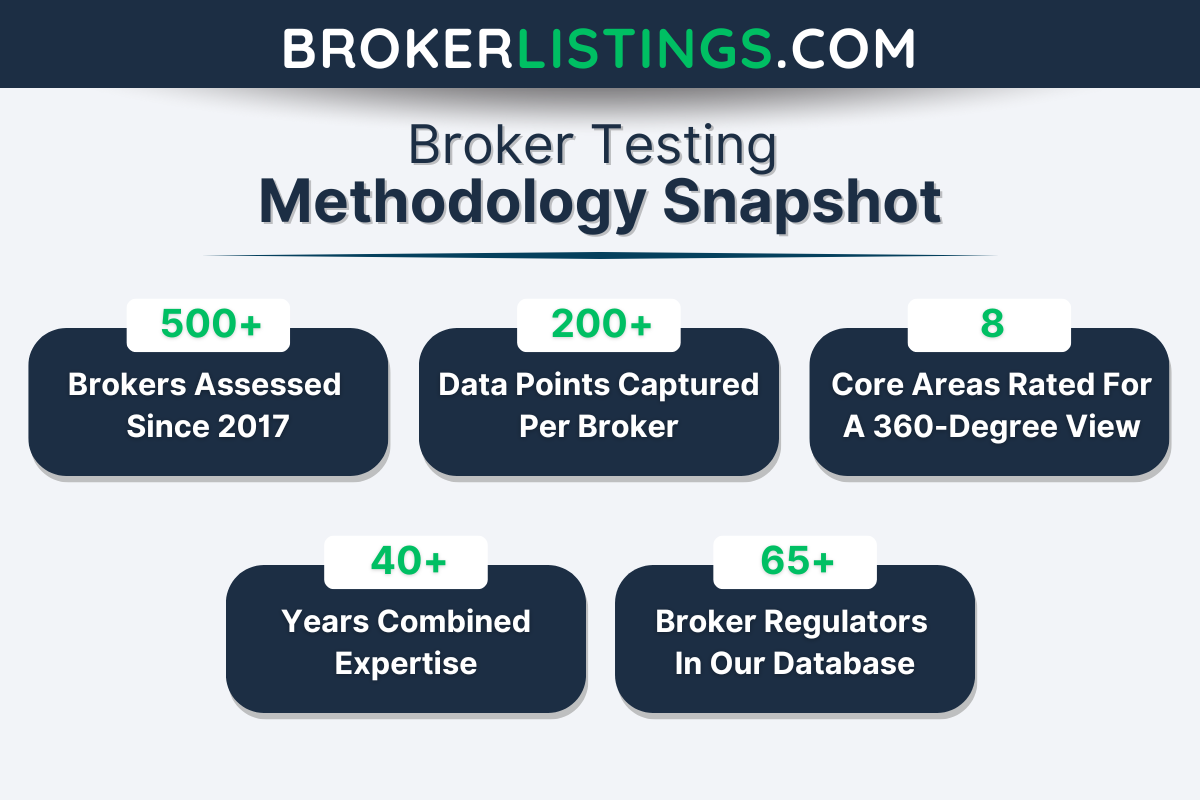
Our process to find the top trading apps was hands-on.
We personally tested each mobile platform, focusing on ease of use, built-in tools, trading costs, and performance.
We also recorded and analyzed user ratings from the Apple App Store and Google Play Store to capture additional trader experiences.
By combining our expert testing with real user opinions, we’ve been able to rate and rank the best broker apps for seamless mobile trading.
What to Look for in a Trading App
Trading apps have made buying and selling assets easier than ever. They let you trade anytime, anywhere.
Yet we know from our hands-on tests and own experience using smartphone apps for personal investments that not all are created equal. Some offer a seamless, feature-packed experience, while others can feel clunky or lack essential tools.
Here are the key things to look for:
User-Friendly Interface and Navigation
An excellent mobile trading app should be easy to use right from the start. When the market is moving quickly, the last thing you want is to waste time hunting for the buy or sell button.
Look for a trading app with a clean design, intuitive navigation, and customizable layouts so you can quickly access everything you need.
Pro tip: Avoid apps that have gamification features that distract you from trading and encourage excessive trading. Robinhood was a serious culprit of this, though it’s since made strides to remove these features.
Testing highlight: If you’re just starting out, the smartphone app from City Index is a fantastic choice. The app is super intuitive, and it’s a platform that helps you build your skills while giving you access to powerful features, including real-time price alerts, performance analytics, and one-swipe trading.
Speed and Execution Reliability
Speed matters – a lot. Whether you’re trading forex, stocks, or crypto, the price you see on your screen can change instantly.
The best trading apps offer lightning-fast execution speeds, ensuring you enter and exit trades exactly when you want.
Avoid broker apps that lag or frequently crash, as a delay of even a few seconds can affect your results, especially if you’re a short-term trader.
Testing highlight: The Pepperstone app delivers ultra-fast order execution of around 30 milliseconds, which is critical for day traders and scalpers. The added bonus of algorithmic trading support ensures you can trade smarter, not harder.
Real-Time Market Data and Charting Tools
Access to live price feeds, real-time charts, and advanced indicators is crucial.
The best trading apps provide interactive charts with multiple timeframes, technical indicators (like RSI, MACD, and Bollinger Bands), and drawing tools so you can analyze the market on the go.
If the app only offers basic charts, it may not be the best choice for serious traders.
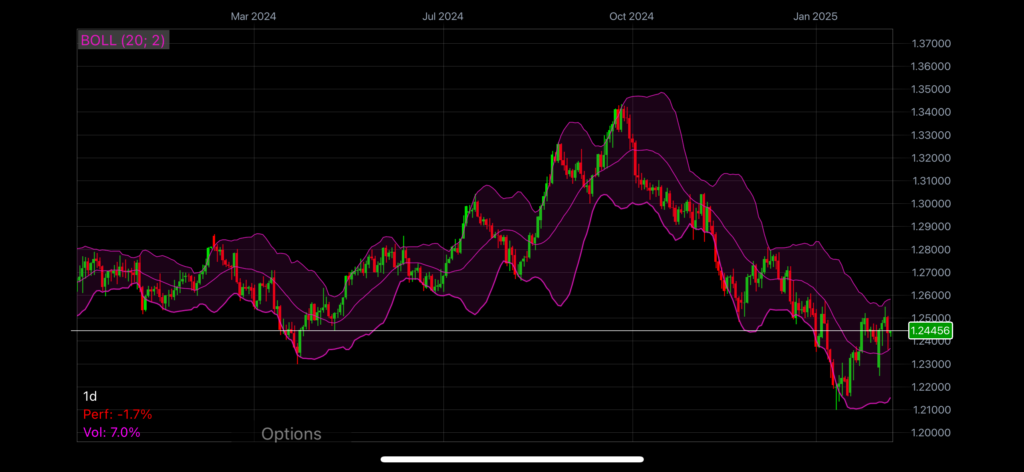
Testing highlight: CMC Markets gives you the mobile tools to stay ahead with its advanced charting (40 indicators and drawing tools). The in-depth market insights and execution speeds make it an ideal app for those who want to make informed decisions quickly.
CMC App
Customization Options
Every trader has their own style, so an app must allow for customization.
Look for broker apps that let you set up personalized watchlists, adjust chart settings, and create custom alerts.
Being able to tailor your trading app to fit your needs can give you an edge.
Testing highlight: I love using the eToro app – its ‘watchlist’, ‘portfolio’ and ‘discover’ features, all available from the bottom menu, make finding instruments a breeze, while the active community makes for a unique and personal trading experience wherever you go.
Risk Management Features
Good trading apps don’t just let you place trades – they help you manage risk effectively.
The best applications allow you to set up stop-loss and take-profit levels easily, ensuring you lock in profits and minimize losses without constantly monitoring the market.
Additionally, features like price alerts and trailing stops can help you control your trades even when you’re away from the screen. Just imagine Elon Musk punches another wild post on X, sending crypto prices rocketing or spiralling – you don’t want to be caught off guard.
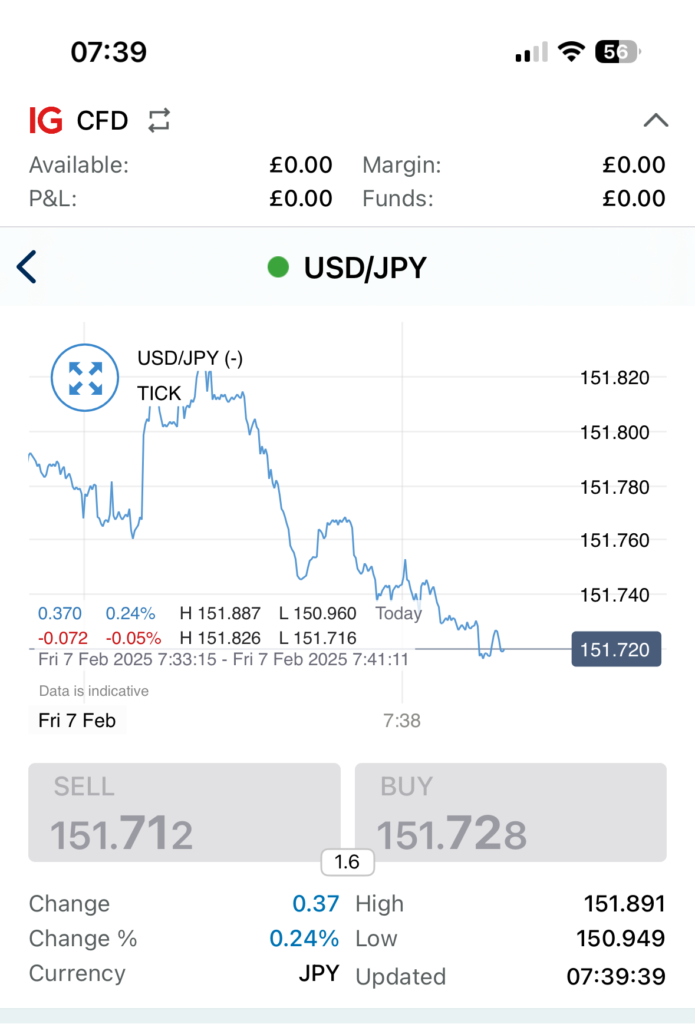
Testing highlight: For traders who value control, IG offers one of the best risk management systems out there. Their smartphone app gives you the power to protect your positions with precision, including guaranteed stops, making it great for managing your exposure.
IG App
Compatibility with Desktop and Web Versions
While mobile trading is convenient, many traders also use desktop platforms for in-depth analysis – myself included.
The ideal trading app should seamlessly sync with a web or desktop version so you can switch between devices without losing important data or settings. This ensures a smooth trading experience across all your devices.
Testing highlight: IC provides smooth trading across all devices with their cTrader, MT4, MT5, and TradingView apps, optimized for both Android and iOS. What sets them apart is how effortlessly they sync the mobile experience with desktop and web solutions, ensuring consistent, professional-grade trading no matter where you are.
Access to Research, News, and Analysis
A good mobile trading app should provide more than just trading functionality – it should also keep you informed. Look for apps offering market news, expert analysis, and sentiment indicators.
Brokers that integrate economic calendars and news updates within their apps make it easier to stay ahead of market-moving events.
Testing highlight: Forex traders looking for advanced research and flexibility will appreciate the app from OANDA. With its comprehensive forex insights through Dow Jones FX Select for expert analysis, plus MarketPulse for live news, it’s tailored for those who want to stay informed in the fast-paced forex market.
Tips for Setting Up a Trading App
Take some time to explore the app’s features and customize it to fit your trading style:
- Set up watchlists for your favourite assets.
- Adjust chart settings to display the indicators you use most.
- Enable price alerts so you never miss key market movements.
- Customize order execution settings to suit your trading strategy.
Most trading apps we’ve evaluated offer different types of orders to help you control how and when you enter trades:
- Market Orders: Instantly buy or sell at the best available price.
- Limit Orders: Set a specific price you want to buy or sell, ensuring you don’t get a worse price.
- Stop Orders: Automatically trigger a buy or sell order when the price reaches a predetermined level.
Expert take: In my opinion, understanding these order types can help you trade efficiently on the go while managing risk.
Once your trade opens, you can monitor its performance directly from the app. You should be able to:
- Modify stop-loss and take-profit levels.
- Add to or partially close positions.
- View real-time profit/loss updates.
Expert take: I always check if a broker allows one-click trading or fast execution modifications to help me react quickly to market changes.
Top-tier mobile trading apps come with powerful tools that can also enhance your trading strategy:
- Technical Indicators: Use tools like moving averages, Fibonacci retracements, and Bollinger Bands to analyze price action.
- Sentiment Analysis: Some apps provide data on market sentiment, helping you gauge trader behaviour.
- Economic Calendars: Stay updated on key events that could impact the market.
- Trading Alerts: Set up push notifications for instant updates on price movements, trend changes, or news.
Expert take: By mastering these features, you can make more informed trading decisions and take full advantage of your broker’s trading app.
Detailed App Reviews and Download Instructions
Found a mobile trading app you like but struggling to download it and get up and running? Alternatively, want to know what apps you can download and how they performed when we tried them on our own mobiles? We’ve reviewed and/or broken down the steps to download the apps of some popular trading brokers:
Bottom Line
Choosing the right trading app comes down to key features. Charting and analysis tools are essential for technical traders, while fast execution and reliability matter for high-volume trading. Risk management tools help control exposure and protect investments.
Beginners should look for intuitive apps with educational resources, while experienced traders may need advanced features like algorithmic trading or custom indicators.
Forex traders should focus on low spreads and flexible lot sizes, while stock and index traders may prefer in-depth market analysis.
Use free trials or demo accounts to test an app before committing. As your needs evolve, be open to switching.
The right smartphone app can elevate your trading – whether you’re a beginner or a pro.
FAQ
What Is A Trading App?
A trading app is a downloadable tool for your mobile or tablet that allows you to analyze financial markets, make trades, and manage your account, all on the go.
What Are the Pros and Cons of Trading From My Mobile?
Pros:
- Trade Anytime, Anywhere: Mobile trading apps let you access markets from anywhere, making staying on top of your positions easier.
- User-Friendly Interfaces: Many apps are designed for smooth navigation, ensuring even beginners can easily place trades.
- Fast Execution: Top trading apps provide near-instant trade execution, helping you quickly take advantage of market opportunities.
- Custom Alerts and Notifications: Get real-time price alerts and market news to stay informed.
- Access to Charts and Analysis Tools: Many apps offer advanced charting capabilities, helping traders make data-driven decisions.
Cons:
- Limited Screen Space: Mobile screens can make in-depth chart analysis and research more complex compared to desktop platforms.
- Connectivity Issues: A weak internet connection can cause execution delays or app crashes.
- Fewer Features: Some mobile apps lack the full functionality of their desktop counterparts, such as in-depth customization options.
- Distractions: Due to easy access, trading on a mobile device can sometimes lead to impulsive decisions.