 Top Lists for USA
How To Connect Eightcap to TradingView
Eightcap is one of the top regulated brokers wired directly into TradingView, so you can chart and place live orders from the same screen. Setup takes a few minutes. You need two things first: an Eightcap TradingView account (you can create one of these inside your Eightcap client dashboard manually), and a free or paid TradingView account (created at TradingView).
 Written By
Christian Harris
Christian is a seasoned analyst, leveraging his expertise in stocks, forex, and crypto to evaluate brokers worldwide. With hands-on trading experience and a strong focus on risk management, he helps traders find reliable platforms. Christian's work for BrokerListings.com has been cited in the Financial Times.
Christian Harris Profile Page Fact Checked By
Tobias Robinson
Tobias is committed to helping traders find the right brokerage for their needs. He has tested 200+ brokers, spent 2,600+ hours using different platforms, and placed 2,100+ trades.
Tobias Robinson Profile Page Edited By
James Barra
James is an experienced broker analyst with a background in financial services. He has spent 2,500+ hours testing brokers, used 35+ different platforms and apps, audited 120+ broker T&Cs, and verified 300+ regulatory licenses. James has also been on US and UK TV, and been a guest on finance podcasts, discussing reports conducted by BrokerListings.com and sharing his expertise.
James Barra Profile PageOctober 7, 2026
Follow these steps:
- Create the Eightcap side. During sign-up, pick TradingView as your platform. Existing clients can log in, choose Request New Account, select TradingView, and generate a new account ID. Eightcap emails you the login credentials for that account.
- Open a chart on TradingView. Go to TradingView, open Supercharts, and find the Trade button at the top-right of the screen.
- Pick the broker. Browse or search for Eightcap.
- Log in. In the pop-up, paste the Eightcap TradingView username and password from your welcome email, taking care not to copy any blank spaces, then click Connect.
- Confirm the link. A green dot next to Eightcap below the chart means you’re live. Your balance, positions, and account stats should appear straight away.
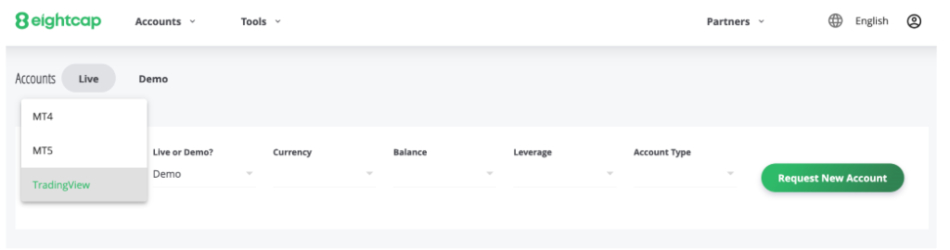
Latency and the TradingView Pro-Tier Value Advantage
Our direct API connectivity testing via the integrated TradingView Trading Panel showed stable structural routing:
- Order Execution Speed: Fills submitted manually from TradingView charts matched the execution speeds of standard MT5 terminals, showing minimal latency variance (<35ms) under normal liquidity conditions.
- The UK Subscription Perk: For traders based inside the UK under the FCA framework, opening and connecting an active TradingView account tier via Eightcap qualifies the user for an ongoing TradingView Plus subscription at no cost (no promo codes needed). This removes an overhead expense of £34.95/month while instantly unlocking advanced multi-chart layouts, custom interval indicators, and an expanded volume of server-side alerts. However, to keep your rolling monthly TradingView Plus plan, you need to trade at least once per month.
- A note about Eightcap mobile use: While the integration works well on desktop browsers and trading apps, logging in to your Eightcap account in the TradingView mobile app may require you to re-enter your credentials more often, especially when switching networks. This is different from the more stable connection you get with the standard MT5 app.
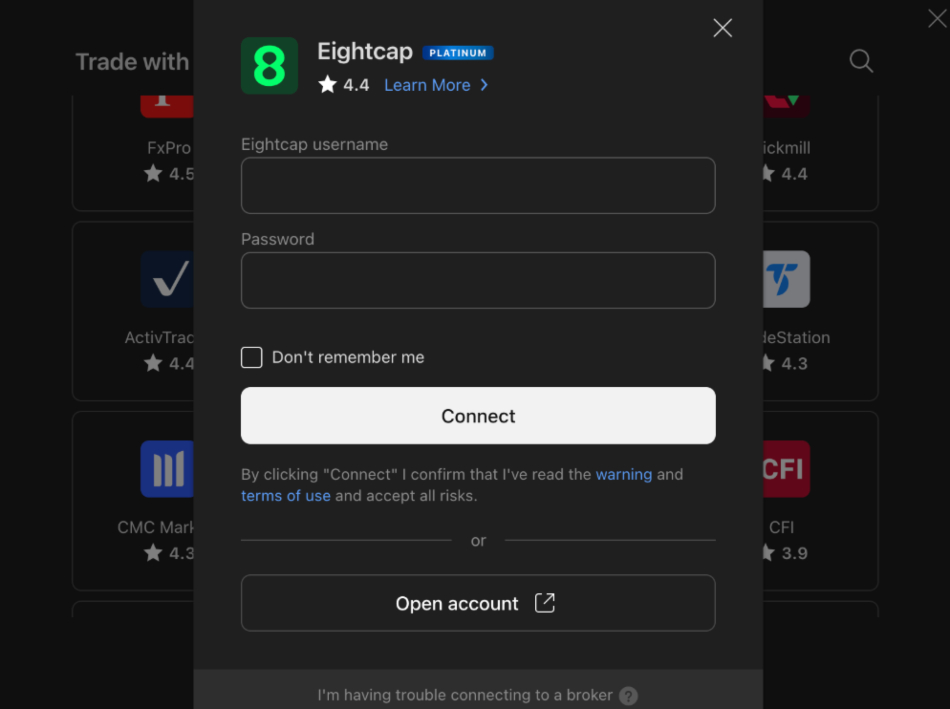
A few things we learned from testing it. You can only link one broker to TradingView at a time, so switching brokers, e.g. from another broker to Eightcap means logging in again. Some accounts need funding before the connection will activate. And availability depends on your entity. UK clients under the FCA arm of Eightcap are limited to TradingView (no MetaTrader), while EU clients under CySEC get MT5 and TradingView but not MT4.