

How To Deposit Money in RoboForex
Funding a RoboForex account is quick and, on the broker’s side, free – RoboForex covers the payment-system commission, so the full amount you send reaches your trading account. Since March 2024, deposits have been accepted only in USD or EUR. Here’s what you can deposit in and how to do it.
 Written By
Christian Harris
Christian is a seasoned analyst, leveraging his expertise in stocks, forex, and crypto to evaluate brokers worldwide. With hands-on trading experience and a strong focus on risk management, he helps traders find reliable platforms. Christian's work for BrokerListings.com has been cited in the Financial Times.
Christian Harris Profile Page Fact Checked By
Tobias Robinson
Tobias is committed to helping traders find the right brokerage for their needs. He has tested 200+ brokers, spent 2,600+ hours using different platforms, and placed 2,100+ trades.
Tobias Robinson Profile Page Edited By
James Barra
James is an experienced broker analyst with a background in financial services. He has spent 2,500+ hours testing brokers, used 35+ different platforms and apps, audited 120+ broker T&Cs, and verified 300+ regulatory licenses. James has also been on US and UK TV, and been a guest on finance podcasts, discussing reports conducted by BrokerListings.com and sharing his expertise.
James Barra Profile PageAugust 18, 2026
Supported Deposit Methods
« Make Full Width »| Method | Type | Typical speed | Notes |
|---|---|---|---|
| Visa / Mastercard / Maestro | Bank card | Minutes | Eligible for the Welcome Bonus |
| China UnionPay | Bank card | Minutes | Bonus-eligible |
| Wire transfer | Bank | Up to a few days | Best for larger amounts |
| Skrill, Neteller | E-wallet | Minutes to same day | Convenient, may carry provider fees |
| Perfect Money, Volet (ecoPayz) | E-wallet | Minutes | Region-dependent |
| Crypto via Difinex (USDT, USDC, BTC, ETH, and others) | Cryptocurrency | Minutes to a few hours | Converted to your USD/EUR base; availability varies by country |
| Local methods (e.g. iDEAL, Trustly, regional transfers) | Bank/local | Varies | Availability depends on country |
Crypto deposits run through the Difinex payment provider, which accepts USDT, USDC, BTC, ETH, and a longer list of coins (TRX, BNB, DAI, BCH, LTC, XRP, DOGE, SOL, SHIB, and LINK among them), with the funds converted to your account’s USD or EUR base on arrival.
The one popular method that’s still not supported by RoboForex is PayPal.
The minimum deposit at RoboForex is $10/€10 for standard accounts ($100 for R StocksTrader).
How To Deposit
Making a deposit to RoboForex is straightforward – we’ve done it. Follow these steps:
- Log in to your RoboForex Members Area.
- Open the Deposit Funds section.
- Pick the RoboForex trading account you want to fund.
- Choose your payment method from the list available in your country.
- Enter the amount — at least $10/€10 in your base currency (or $100 for R StocksTrader).
- Confirm the payment and complete any card or wallet authentication.
- Check that the balance shows on your trading account; card and e-wallet deposits usually appear within minutes, based on our testing.
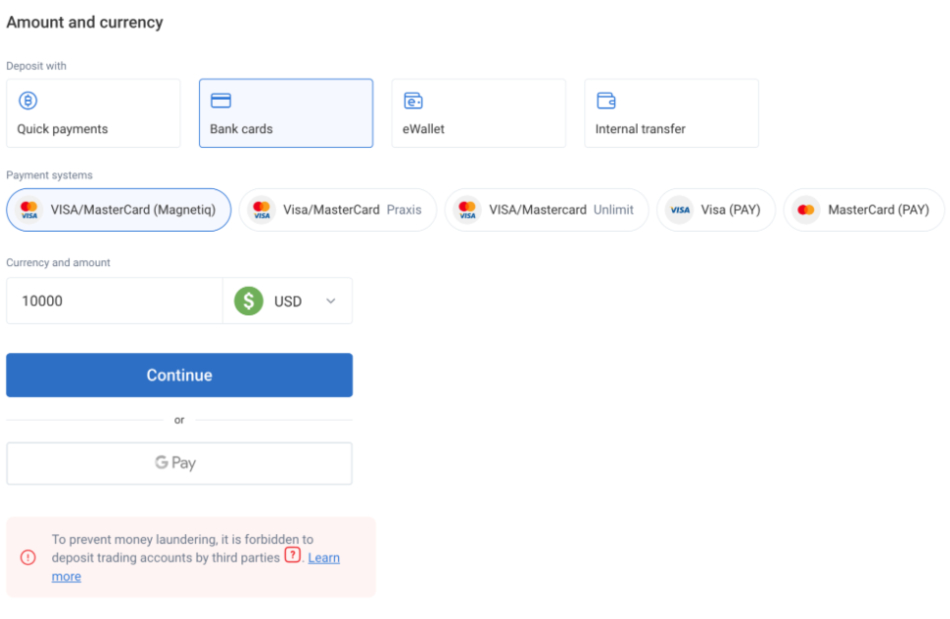
The RoboForex cashier area is intuitive