 Top Lists for USA
How To Sell On eToro
On eToro, selling can mean two different things, and they work in opposite ways. If you want to sell something you already own, you close the position by opening your Portfolio, choosing the trade, and pressing ‘Close’. If you want to try and make money when an asset’s price drops and you don’t own it, you open a Short position, which eToro handles as a CFD, depending on your location.
 Written By
Christian Harris
Christian is a seasoned analyst, leveraging his expertise in stocks, forex, and crypto to evaluate brokers worldwide. With hands-on trading experience and a strong focus on risk management, he helps traders find reliable platforms. Christian's work for BrokerListings.com has been cited in the Financial Times.
Christian Harris Profile Page Fact Checked By
Tobias Robinson
Tobias is committed to helping traders find the right brokerage for their needs. He has tested 200+ brokers, spent 2,600+ hours using different platforms, and placed 2,100+ trades.
Tobias Robinson Profile Page Edited By
James Barra
James is an experienced broker analyst with a background in financial services. He has spent 2,500+ hours testing brokers, used 35+ different platforms and apps, audited 120+ broker T&Cs, and verified 300+ regulatory licenses. James has also been on US and UK TV, and been a guest on finance podcasts, discussing reports conducted by BrokerListings.com and sharing his expertise.
James Barra Profile PageOctober 22, 2026
Closing A Trade vs Opening A Short On eToro
Closing a position means selling something you already own. Shorting, on the other hand, means opening a new position to profit if the price falls.
| Close Trade | Short | |
|---|---|---|
| What it does | Ends an existing Buy or Short position and realizes the profit or loss | Opens a new position that gains if the price falls |
| Do you need to own the asset? | Yes, it must be in your Portfolio | No |
| Extra funds needed | None | Yes, the amount you put into the new trade |
| Product | Same as the position, real asset or CFD | Always a CFD |
| Price you get | Buy positions close at the bid; shorts close at the ask | Opens at the bid |
If you close a Buy position on a real stock, you no longer own those shares. The money from your sale, including any profit or loss, goes back into your balance and you can withdraw or reinvest it right away.
It’s worth noting that eToro charges a fixed commission of $1 or $2 USD per trade action (including both opening and closing) for real, underlying stock positions. This fee does not apply to CFDs, which instead use a spread (i.e., 0.15%).
How To Sell (Close) A Position On eToro
I’ve traded with real money at eToro for years – the steps are almost identical on the web platform and the eToro app:
- Open your Portfolio. On the web, click Portfolio in the left-hand menu. In the app, tap Portfolio at the bottom of the screen.
- Pick the asset. Click or tap the asset to see each position you hold. If you buy the same asset multiple times, you’ll see three rows, each with its own open price.
- Choose the position. On the web and the app, click the red ‘Close’ button next to it.
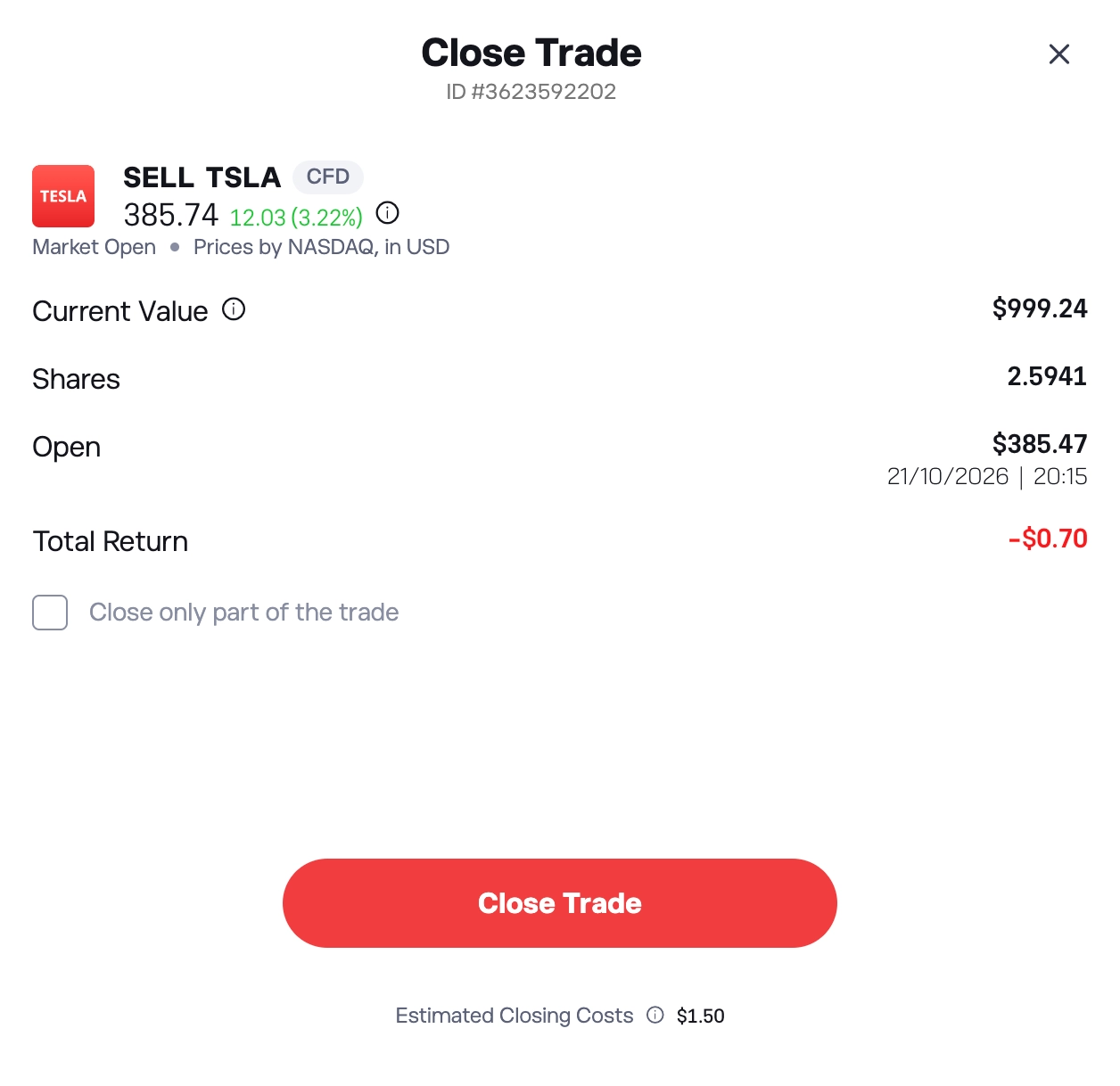
- Review the summary, then confirm your choice. The close screen shows your position’s current value and the profit or loss you will get. eToro does not give a second warning after you click. Press ‘Close’ to finish selling.
If you try to close a position while the market is closed, it will move into a pending close state and sell when the market opens again. You can cancel it before then, as eToro explains in its closing tutorial.
You cannot sell a stock if its exchange has halted trading. Instead, you have to wait until trading resumes before you can close those positions.
Selling Part Of A Position, Or Everything At Once
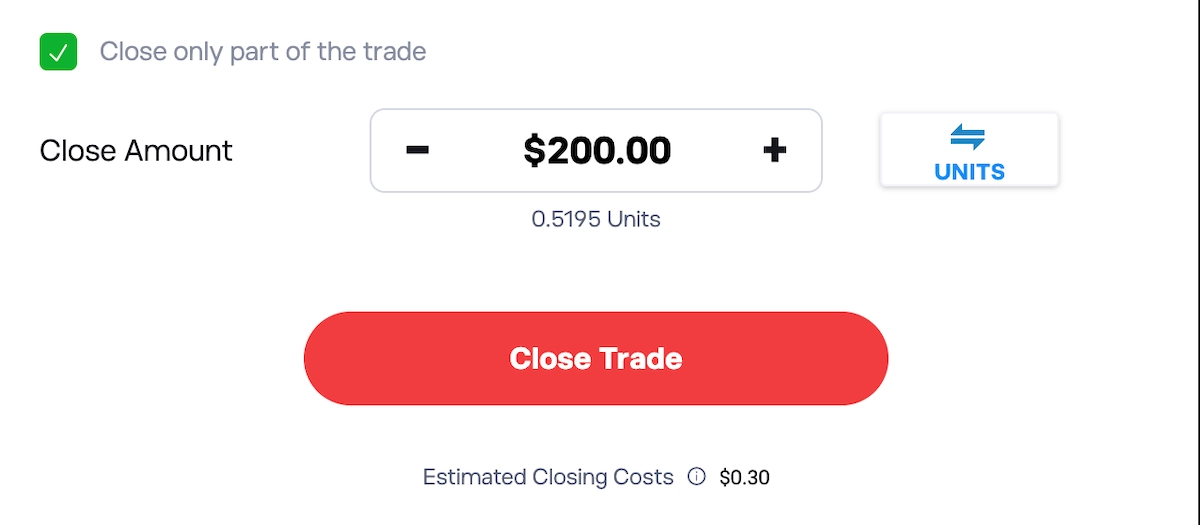
If you want to sell just part of your holding, select ‘Close only part of the trade’ on the close screen and enter the amount or number of units. eToro allows this only if both the part you sell and the part you keep are above the asset’s minimum trade size. The Stop Loss and Take Profit for the remaining part will adjust automatically.
If you have more than one position in the same asset, you can use the ‘Close All’ button to sell them all at once, both on the web and in the app.
You can also have eToro sell for you automatically. Setting a Stop Loss or Take Profit will close your position at the level you choose. However, eToro does not guarantee Stop Losses. If there is a price gap, your trade will close at the next available price.
How To Sell Copied Positions On eToro
When you copy trades, they close automatically when the investor you follow closes them. But you can also sell them yourself. eToro lets you close a single copied trade without stopping the whole copy. Just click the investor’s name in your Portfolio to see their trades, then close one as explained above.
To sell the whole copy:
- Open the copy. Go to your Portfolio and click the investor you want to stop copying.
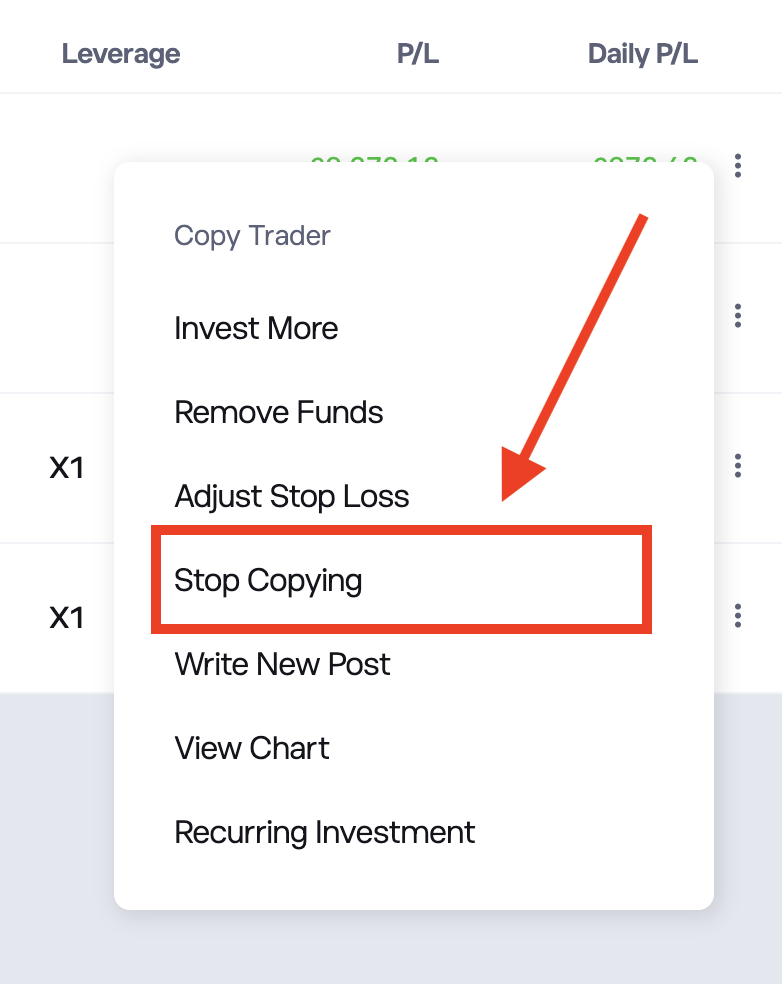
- Open the menu. Click the three-dot icon next to their name and choose ‘Stop Copying’.
- Pick ‘Close All’. This sells every copied position and moves the money to your Cash Available balance. ‘Keep All’ ends the copy without selling, turning the positions into manual trades in your own portfolio.
- Confirm. Press ‘Confirm’ to finish.
A Copy Stop Loss is different: if your copy’s losses reach the percentage you set, eToro will automatically sell every position in that copy.
How To Short Sell On eToro
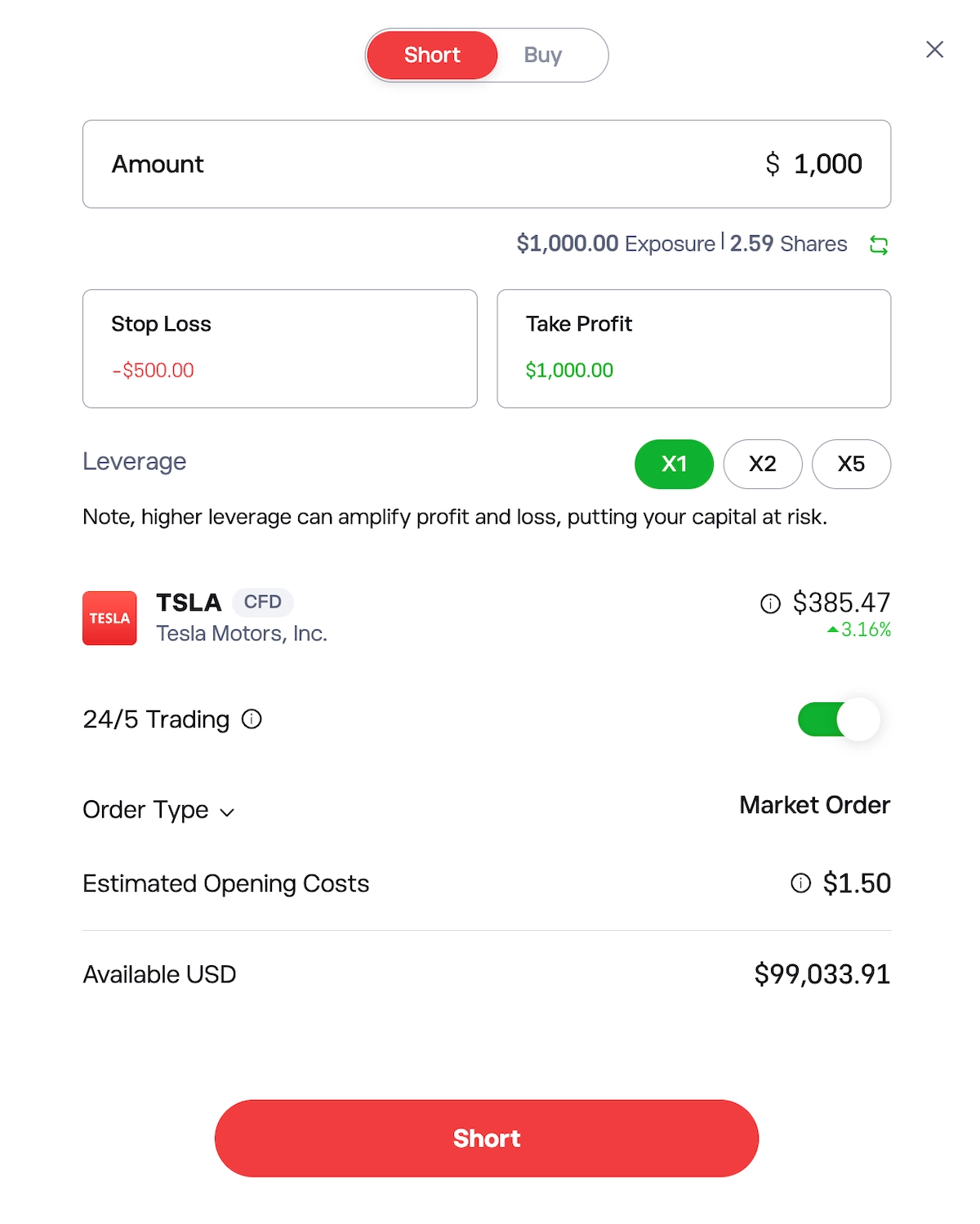
On eToro, short selling means opening a Short CFD, so you do not borrow or own the shares. Older guides say to press ‘Sell’, but the button is now labeled ‘Short’.
- Find the asset. Search for the stock, ETF, index, commodity, or currency you expect to fall.
- Open the trade ticket. Click ‘Trade’ on the asset’s page.
- Switch to Short by selecting ‘Short’ on the trade ticket. If this option is greyed out, eToro has blocked shorting for that asset. This usually happens if there are no shares to borrow, the market is very volatile, or local rules do not allow it.
- Set the amount, choose your leverage, and add a Stop Loss and Take Profit. The trade ticket will show that it is a “CFD” and list the spread and overnight fees.
- Press Short. The position opens at the bid price and appears in your Portfolio. To close a Short, close it like any other position. Note for UK Clients: Retail clients cannot short crypto, since all eToro shorts are CFDs and the FCA still bans authorized firms from offering crypto CFDs for retail investors.
The Risks Of Short Selling On eToro
Short selling has unlimited loss potential because prices can keep rising. eToro’s risk disclosure makes clear a CFD can lose more than you invested in that trade, but never more than your account equity.
eToro may also automatically close a short position. If your account does not meet margin requirements, eToro can close one or more positions, and you are responsible for any losses. Dividends work the opposite way too: if a company pays a dividend while you are short, eToro will deduct that amount from your cash.
Bottom Line
Selling what you own on eToro is quick and easy, and the only real trap is the Short button, which opens a new CFD instead of cashing you out.
Shorting is a whole different scenario. Every short is a CFD in regions where it offers CFDs (not the US), losses have no ceiling, and retail clients in certain jurisdictions like the UK can’t short crypto at all. eToro makes selling what you own easy. Betting against what you don’t is a CFD trade with CFD risks, and should be treated that way.
To learn more about eToro’s fees, features, and platforms, read our full eToro review. If you want to know how your money is protected, see our guide on is eToro safe or not?