

RoboForex Leverage: Maximums & How To Change
RoboForex sits at the high end of the leverage scale. The top amount available is 1:2000, but that number only applies to specific accounts and asset classes, so the headline can mislead if you take it at face value.
 Written By
Christian Harris
Christian is a seasoned analyst, leveraging his expertise in stocks, forex, and crypto to evaluate brokers worldwide. With hands-on trading experience and a strong focus on risk management, he helps traders find reliable platforms. Christian's work for BrokerListings.com has been cited in the Financial Times.
Christian Harris Profile Page Fact Checked By
Tobias Robinson
Tobias is committed to helping traders find the right brokerage for their needs. He has tested 200+ brokers, spent 2,600+ hours using different platforms, and placed 2,100+ trades.
Tobias Robinson Profile Page Edited By
James Barra
James is an experienced broker analyst with a background in financial services. He has spent 2,500+ hours testing brokers, used 35+ different platforms and apps, audited 120+ broker T&Cs, and verified 300+ regulatory licenses. James has also been on US and UK TV, and been a guest on finance podcasts, discussing reports conducted by BrokerListings.com and sharing his expertise.
James Barra Profile PageAugust 18, 2026
Leverage By Account Type
The maximum leverage partly depends on which RoboForex account you hold:
« Make Full Width »| Account | Maximum forex leverage |
|---|---|
| ProCent | Up to 1:2000 |
| Pro | Up to 1:2000 |
| ECN | Up to 1:500 |
| Prime | Up to 1:300 |
| R StocksTrader | Up to 1:20 (stocks/ETFs) |
The 1:2000 ceiling applies to the Pro and ProCent accounts. The ECN and Prime accounts are capped lower because they’re built around raw spreads and tighter institutional-style conditions.
Such high leverage requires disciplined risk management and makes RoboForex less suited to beginners unless they lower their exposure – we explain how this can be done further below.
Leverage By Asset Class
Leverage also depends on what you trade, not just which account you hold:
« Make Full Width »| Asset class | Maximum leverage |
|---|---|
| Forex | Up to 1:2000 |
| Metals (e.g. gold) | Up to 1:1000 |
| Indices | Up to 1:100 |
| Energies | Up to 1:100 |
| Cryptocurrencies | Around 1:50 |
| Stocks / ETFs | Up to 1:20 |
| Soft commodities | Up to 1:20 |
The Rules That Quietly Reduce Your Leverage
Two things caught us out when testing RoboForex, so they’re worth knowing up front:
- Equity-based tapering. Once your account equity passes $10,000, the 1:2000 ceiling automatically steps down to 1:1000. The bigger your account, the lower your max leverage.
- Weekend reductions. Leverage can be cut temporarily around weekends and market closes to manage gap risk.
How To Set Or Change Your Leverage
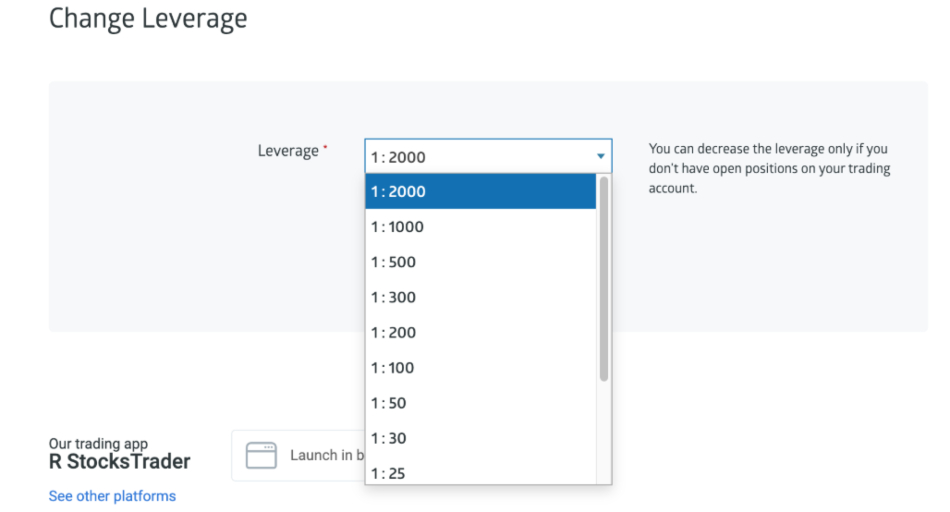
In our RoboForex account we amended the leverage available – it’s straightforward:
- Log in to the Members Area.
- Open the account settings for the specific trading account.
- Find the leverage field and select a tier for that account type.
- Confirm the change — it usually applies right away, subject to open-position and equity rules.
- Recheck after any large deposit, since crossing the $10,000 equity line can move you down a tier.
Our Take
At 1:2000, RoboForex is a high leverage broker – much higher than most well-regulated brokers offer, and it comes with benefits and significant risks. It allows small accounts to take larger positions, but it also means a small price change can quickly lead to big losses.
If you’re new, think of the maximum leverage as something you’ll rarely use, not as a goal. The equity reduction is a smart risk measure, and weekend cuts are standard in the industry.