 Top Lists for USA
How To Open An Interactive Brokers Account
Opening an account at Interactive Brokers is done online. It took us longer than an app-only broker, mainly because IBKR asks more questions about your trading background. Budget 15–20 minutes for the form, then a day or two for approval.
 Written By
Christian Harris
Christian is a seasoned analyst, leveraging his expertise in stocks, forex, and crypto to evaluate brokers worldwide. With hands-on trading experience and a strong focus on risk management, he helps traders find reliable platforms. Christian's work for BrokerListings.com has been cited in the Financial Times.
Christian Harris Profile Page Fact Checked By
Tobias Robinson
Tobias is committed to helping traders find the right brokerage for their needs. He has tested 200+ brokers, spent 2,600+ hours using different platforms, and placed 2,100+ trades.
Tobias Robinson Profile Page Edited By
James Barra
James is an experienced broker analyst with a background in financial services. He has spent 2,500+ hours testing brokers, used 35+ different platforms and apps, audited 120+ broker T&Cs, and verified 300+ regulatory licenses. James has also been on US and UK TV, and been a guest on finance podcasts, discussing reports conducted by BrokerListings.com and sharing his expertise.
James Barra Profile PageJuly 23, 2026
Step By Step
Here’s the path two of our team have followed on separate occasions:
- Start the application. Head to the broker’s site and pick your account type. Most people want the Individual account, but there are also Joint, Trust, IRA (US), Corporate, and Advisor options. You’ll also need to choose between a Cash account (you can only trade with money you’ve deposited) and a Margin account (allows leverage and shorting, but is much riskier and generally requires a $2,000 minimum balance).
- Choose Lite or Pro. You select your pricing plan during setup. US and Singapore residents can pick the commission-free IBKR Lite, which applies to select stocks and ETFs; most other countries (and most active traders) land on IBKR Pro. You can switch later.
- Pick your base currency. Choose your local currency to base your account in (e.g., USD, GBP, or EUR). This determines the currency used for your reports and account. If you buy international stocks IBKR often automatically converts currency when trading, or lets you hold multi-currency cash balances.
- Prove who you are. You’ll upload photo ID and proof of address, and answer questions about your income, net worth, and trading experience. The experience questions actually gate some products, so answer honestly rather than ticking every box. If you’re a non-US resident trading US stocks, you’ll also sign a digital W-8BEN form as part of this step. We’ve done it – it only takes a couple of clicks and automatically reduces US dividend tax withholding from 30% in line with treaty agreements, where they exist.
- Set up two-factor authentication. This is mandatory. We installed the IBKR Mobile authenticator, which you’ll then need every time you log in.
- Wait for approval, then fund. Once you’re cleared, you transfer money in. There’s a $0 minimum to open, though you’ll need at least $2,000 in the account to switch margin on.
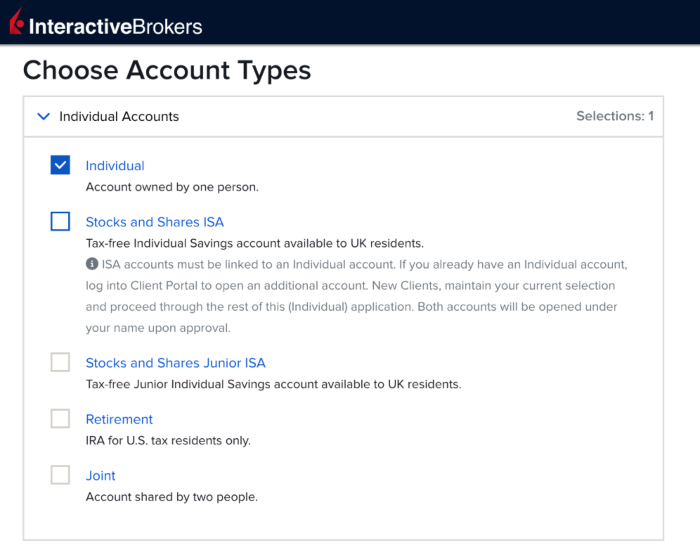
Interactive Brokers offers more types of accounts than most no-frills online brokers, including ISAs for UK residents
What You’ll Need Ready
We collected these documents before signing up at IBKR – it made the process much smoother:
- Government photo ID (passport, driving license or national identity card)
- Proof of address dated within the last few months
- National insurance / tax ID number
- Bank details for funding
Is The Sign-Up Smooth?
Interactive Brokers has one of the slower, more outdated account sign-up processes we’ve encountered. At BrokerListings, we’ve signed up for over 100 live and demo trading accounts at online brokers, and IBKR stands out for not having increasingly available solutions like fast sign-ups via existing social accounts, such as Google, Apple or Facebook, plus account configuration forms that are cumbersome and that sport an old-school design.
Funding The Account
Funding isn’t Interactive Brokers’ strongest point. Outside the US, you’re mostly limited to local or international bank wires or Wise, with no debit cards or PayPal. US clients get more options, including ACH transfers and cheques (not many brokers still accept cheques). The first one or two withdrawals each month are generally free (country dependent – e.g. two in US, one in Japan). After that, you pay a small fee. Plan your transfers accordingly.
Why Has My IBKR Application Not Been Approved?
If your account application approval has been delayed, it could be due to several reasons. We combed through user reviews and our own experience to highlight the most likely causes:
- You put a different name or address across documents.
- Your proof of address is too old or cropped.
- A document is blurred or submitted in an unsupported format.
- A driving licence has been used for both ID and address where IBKR requires separate evidence.
- Your tax-residency information is incomplete.
- Your requested trading permissions, i.e. products and settings, do not match your stated experience.
- Outstanding tasks still remain in Client Portal after the main form has been submitted (we missed some of these the first time).