

Does Exness Have A Cent Account?
Yes, Exness offers a cent trading account. Select ‘Standard Cent’ at sign-up, and your balance will be shown in cents or another available cent currency. For example, deposit $10, and your balance will show as 1000 USC (1000 cents). It’s best suited to newer traders.
 Written By
James Barra
James is an experienced broker analyst with a background in financial services. He has spent 2,500+ hours testing brokers, used 35+ different platforms and apps, audited 120+ broker T&Cs, and verified 300+ regulatory licenses. James has also been on US and UK TV, and been a guest on finance podcasts, discussing reports conducted by BrokerListings.com and sharing his expertise.
James Barra Profile Page Fact Checked By
Tobias Robinson
Tobias is committed to helping traders find the right brokerage for their needs. He has tested 200+ brokers, spent 2,600+ hours using different platforms, and placed 2,100+ trades.
Tobias Robinson Profile Page Edited By
William Berg
William Berg combines his expertise in law and finance to analyze trading brokers. He has checked 3,250+ regulatory licenses, investigated 2,365+ broker clones and trading scams, and placed 3,500+ trades.
William Berg Profile PageSeptember 22, 2026
How Does Exness’ Cent Account Work?
The Exness Standard Cent account uses trading volumes in cent lots, where 1 cent lot is equal to 100,000 cents or $1,000. With a standard lot equal to $100,000, 1 cent lot is 1,000/100,000, which is equal to 0.01 standard lot.
Let’s say I want to trade EUR/USD. On a typical trading account, a 0.01 standard lot trade represents $1,000 and is worth roughly $0.10 per pip. On the Exness Standard Cent account, a 0.01 cent lot trade represents just $10, making each pip worth roughly $0.001. An adverse 50-pip move would therefore lose me about $0.05 on the cent trade compared to $5.00 on a normal 0.01-lot trade (excluding spreads, swaps and other costs).
Essentially, the cent account means you can take much smaller position sizes, which can be useful for inexperienced traders and those looking to test strategies with less upfront capital.
Cent Account Details
« Make Full Width »| Feature | Exness Standard Cent |
|---|---|
| Available Platforms | MT4, MT5, Exness Terminal (in some regions) |
| Supported Markets | Forex, gold, silver, BTC (not on MT4 or via Kenyan entity) and ETH (not on MT4) |
| Account Currencies | USC, EUC, GBC, CHC, AUC, CAC |
| Demo Cent Account | No |
| Execution | Market execution with no requotes |
| Minimum Deposit | Varies by method and location, but can start from $10 |
| Minimum Trade | 0.01 cent lots (10 units); ETHUSDc: 0.1 cent lots |
| Spreads | From 0.3 pips (often it’s higher depending on the asset and market conditions) |
| Commission | No commission |
| Leverage | Up to 1:Unlimited (subject to eligibility and entity, e.g. 1:400 at Kenyan entity) |
| Margin Call | 60% |
| Stop Out | 0% (not via Kenyan entity) |
| Symbol Suffix | -c, e.g. EURUSDc |
| Maximum Trade Size | 200 cent lots; ETHUSDc: 2,000 cent lots |
How To Open An Exness Cent Account
I opened a real cent account at Exness – it’s straightforward. Follow these steps:
- Sign up for an account: You’ll need to enter your name, email address, and a password. Alternatively, you can register through an existing email account.
- Find the cent account: In the client portal, select ‘Accounts’ under ‘Trading’ in the left-hand menu, then click ‘+ Open Account’ to the right of the screen. Under the ‘Standard Accounts’ list, you should see ‘Standard Cent’ – click this and then press the yellow ‘Continue’ box at the bottom.
- Configure the account: You can choose the currency (USC, EUC, GBC, CHC, AUC, CAC – I chose USC), an account nickname (I opted for ‘Cent Strategy Account’), max leverage (I chose 1:200), platform (MT4 or MT5 – I chose MT5), and trading password. The account should be automatically created and show under ‘My accounts’ in the personal area, where you can click ‘Trade’, ‘Deposit’ or ‘Transfer’, and manage the account settings.
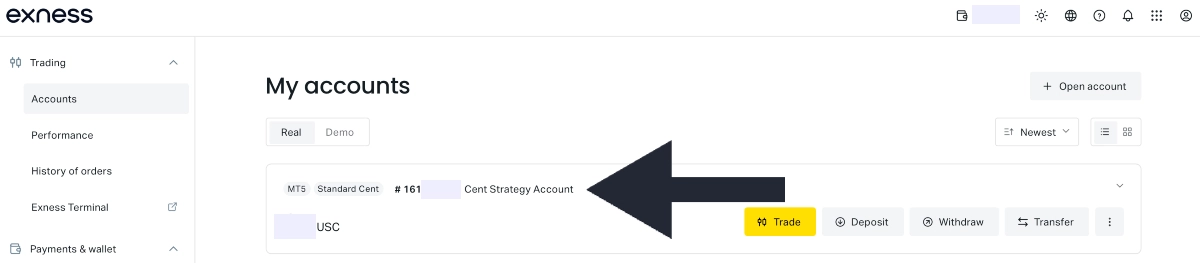
Live Exness standard cent account creation
Exness Cent Account Vs Alternatives
The Exness cent account offers a competitive package – it’s better than alternatives in some categories but trails some top-rated cent account brokers elsewhere:
- Asset range: Exness only offers around 30 assets in its Cent account, consisting of 26 forex pairs, 2 metals, 2 crypto, and US oil, while InstaForex offers over 300, offering more currencies and other asset classes.
- Fees: Spreads on the Exness cent account are average to low, starting from 0.3 pips but often higher in choppy markets and on less liquid assets. These are lower than RoboForex, whose cent spreads start at 1.3 pips, but higher than the spreads from 0.0 pips you get at Vantage.
- Demo account: The Standard Cent account is the only account type from Exness that doesn’t come with a demo mode. If you’re a beginner wanting to try the cent setup in paper trading mode first, an alternative like FBS is better.
- Leverage: Exness offers the highest leverage of any cent account we’ve tested, reaching unlimited levels unless you’re trading through the Kenyan entity, where the cap is 1:400. Suppose you have $10 (1,000 cents) in your account, 1:500 leverage gives you market exposure to the tune of $5,000, while 1:2000 leverage gives you up to $20,000. That’s 4x higher with the same modest cent balance, magnifying potential returns but also losses. As a result, high leverage, even in a cent-based account, necessitates careful risk management.
- Education: Exness needs to improve its suite of educational resources, which may be important to some inexperienced cent account holders. There’s a lack of in-depth structured training materials compared to some cent account providers, notably Vantage.
Overall, Exness offers a useful cent account for beginners looking to minimize their real-money exposure, but it’s restrictive in some areas, notably the modest selection of assets and the lack of high-quality education and demo mode, which could support newer traders further.