

How To Use the CMC Markets Platform
The CMC Markets‘ multi-asset web platform takes some time to learn, but if you invest the hours and follow the steps below you can find assets, perform charting analysis, digest integrated research, place trades, and manage your portfolio.
 Written By
Christian Harris
Christian is a seasoned analyst, leveraging his expertise in stocks, forex, and crypto to evaluate brokers worldwide. With hands-on trading experience and a strong focus on risk management, he helps traders find reliable platforms. Christian's work for BrokerListings.com has been cited in the Financial Times.
Christian Harris Profile Page Fact Checked By
Tobias Robinson
Tobias is committed to helping traders find the right brokerage for their needs. He has tested 200+ brokers, spent 2,600+ hours using different platforms, and placed 2,100+ trades.
Tobias Robinson Profile Page Edited By
James Barra
James is an experienced broker analyst with a background in financial services. He has spent 2,500+ hours testing brokers, used 35+ different platforms and apps, audited 120+ broker T&Cs, and verified 300+ regulatory licenses. James has also been on US and UK TV, and been a guest on finance podcasts, discussing reports conducted by BrokerListings.com and sharing his expertise.
James Barra Profile PageJuly 30, 2026
Step 1: Learn The Basics
The proprietary platform runs in your browser, so no download is needed. Once you’ve opened the dashboard the first thing is to understand the core features:
- Watchlists: Pre-built or custom lists of instruments. As you can see further below I made my own watchlist but CMC has pre-built some popular lists.
- Product Library: Searchable catalogue of 12,000+ markets. This includes the largest library of forex assets we’ve seen on a retail trading platform – there’s over 300.
- Charts: Multi-panel charting workspace. I like to stick to one chart in the CMC platform so I can see my technical analysis more clearly and so I’m not distracted by other assets and charts.
- Orders: Live and pending order tracker. I’ve used both depending on my setup, which is normally swing trading where I opt for live orders with take-profit and stop-loss parameters.
- Account: Margin, equity, balance, open positions. I check this daily to monitor existing positions and to check I have enough capital to fund new positions.
The layout can be customized by dragging, resizing, and locking panels. I recommend spending at least 1 hour setting up your workspace before you start trading. The default layout is not ideal for active traders.
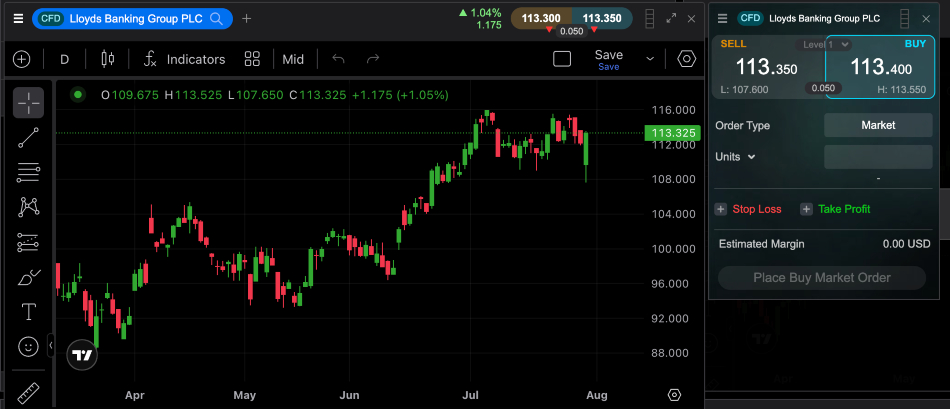
Interface
Step 2: Find Something to Trade
There are three ways to find an instrument in the CMC platform:
- Search bar: Type the name or ticker (EUR/USD, Apple, Gold)
- Watchlist: Scroll your saved lists. Below is my ‘US Tech Stocks’ watchlist open.
- Product Library: Filter by asset class, region, or sector
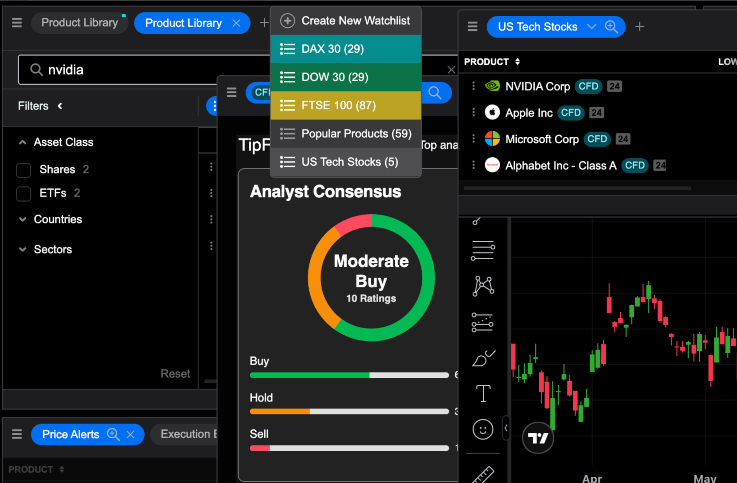
Watchlists
The Product Library includes a Forex Indices section. These are baskets of currencies that are not available at most other brokers. They are worth exploring once you are comfortable with the basics.
Step 3: Place a Trade
Click an instrument, then hit Buy or Sell. The order window covers:
- Order type: Market, Limit, Stop Entry
- Quantity: Units or lots depending on the market
- Stop Loss: Fixed or trailing
- Take Profit: Your target exit
- GSLO: Optional guaranteed stop that protects from market gapping and execution issues, premium shown upfront and charged only if executed. It can offer guaranteed stop loss orders in part because CMC is a market maker, taking the opposing side of trades.
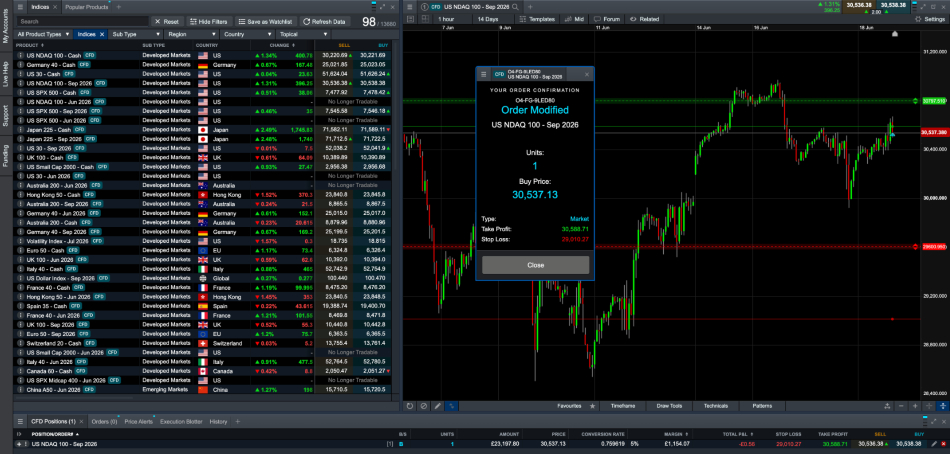
Order Modification
One frustration I’ve found is that stop-loss and take-profit levels do not appear on the chart until after you place the order. You cannot set your stops visually before confirming. Once the trade is live, you can drag the stop and take profit lines on the chart, which works well.
Step 4: Watch Your Open Trades
The Positions panel shows:
- Entry price vs current price
- Unrealized P&L in real time
- Margin used per trade
- Options to partially close, adjust stops, or close fully
Watch the margin meter at the top of the screen. If it reaches the set level, your positions will begin to close automatically.

Order History
Step 5: Use the Charts
This is where the platform earns its reputation. You get:
- 115+ technical indicators — MACD, RSI, Bollinger Bands, Ichimoku
- 40+ drawing tools — trend lines, Fibonacci, channels
- Timeframes from 1-minute to monthly
- Up to 4 charts open at once
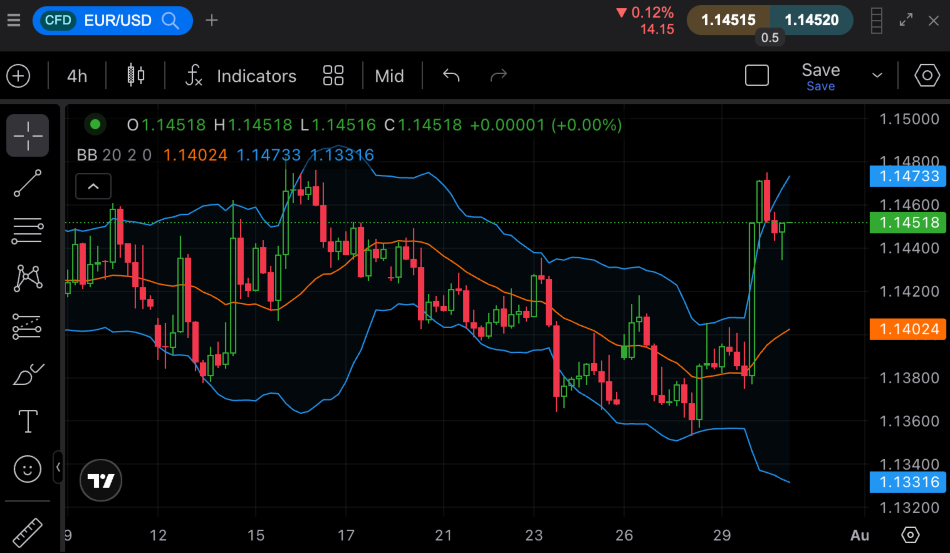
Charting analysis
The pattern recognition scanner is worth a look at. It automatically spots chart formations — head-and-shoulders, triangles, double tops — across your watchlist. It’s not perfect, but it’s useful for quickly scanning a large list.
Step 6: MetaTrader (For Automated Trading)
CMC supports both MetaTrader desktop and web platforms, as well as the mobile platform.
- MT4 is better if you use Expert Advisors (EAs) for automated strategies
- MT5 has more order types, a built-in economic calendar, and more timeframes but it’s not available in all CMC regions
- VPS hosting is available, keeping your EAs running 24 hours a day, 5 days a week, even when your computer is off.
Step 7: Built-In Research
Don’t ignore these:
- Economic Calendar with low/medium/high impact labels
- Reuters and Morningstar news in real time
- CMC TV — market analysis videos a few times a week, embedded in the platform
- AI News — summarises market stories (it’s a research tool, not a trade bot)
- Client Sentiment — shows what percentage of CMC clients are long or short on any market
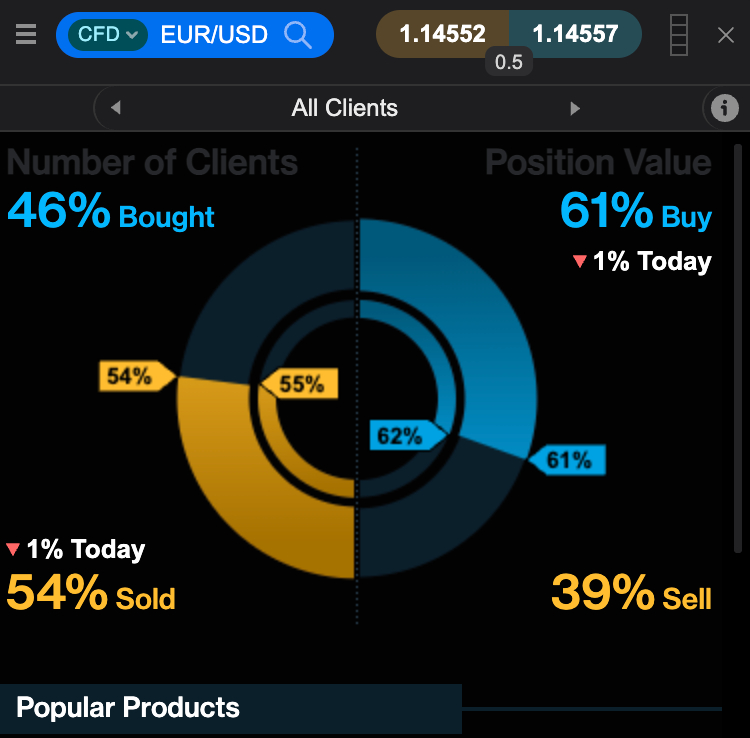
Client sentiment
Step 8: The Mobile App
Strong trading functionality on iOS and Android — not a cut-down version. Charting on mobile works well with touch controls. The Insights tab displays Hot Products and Price Movers, which help you find ideas quickly. However, for detailed analysis, the desktop platform is much better.
CMC Platform Comparison
« Make Full Width »| Feature | CMC Web Platform | MT4 / MT5 |
|---|---|---|
| Indicators | 80+ | 30+ (MT4) / 80+ (MT5) |
| Drawing Tools | 40+ | Standard set |
| Automated Trading | No | Yes (EAs) |
| Mobile App | Yes | Yes |
| Best For | Manual traders | Algo traders |
Note not all MetaTrader platforms are available in all regions. For example, MT5 is not available to UK clients.