

XTB vs XM
Which broker is superior: XTB or XM? Read our comparison of the two brokers to help you choose the right one for your trading needs.
XTB and XM were both tested in a live account by the BrokerListings team. We spent 50+ hours reviewing XTB and XM and comparing them.
 Written By
James Barra
James is an experienced broker analyst with a background in financial services. He has spent 2,500+ hours testing brokers, used 35+ different platforms and apps, audited 120+ broker T&Cs, and verified 300+ regulatory licenses. James has also been on US and UK TV, and been a guest on finance podcasts, discussing reports conducted by BrokerListings.com and sharing his expertise.
James Barra Profile Page Fact Checked By
William Berg
William Berg combines his expertise in law and finance to analyze trading brokers. He has checked 3,250+ regulatory licenses, investigated 2,365+ broker clones and trading scams, and placed 3,500+ trades.
William Berg Profile Page Edited By
Tobias Robinson
Tobias is committed to helping traders find the right brokerage for their needs. He has tested 200+ brokers, spent 2,600+ hours using different platforms, and placed 2,100+ trades.
Tobias Robinson Profile PageSeptember 10, 2026
Quick Verdict
Neither XTB nor XM accepts traders from USA. Instead, we recommend Interactive Brokers, a top-rated alternative that impressed our team during testing and accepts traders from your location.

XTB is stronger for investors who want real stocks, ETFs, Investment Plans, and interest on idle cash. XM is better suited to traders who want MT4, MT5, copy trading, VPS access, and round-the-clock support.
Both brokers offer low entry barriers, broad CFD markets, demo accounts, negative balance protection, and several regulated entities. Their forex costs and market coverage are close, but their platform approach is very different.
XTB delivers a polished in-house platform and more long-term investing features. XM provides more account choice, stronger learning material, wider support hours, and better tools for automated strategies.
Regulation & Trust
XTB and XM sit close together on trust, but XTB has the clearer overall corporate structure. It is listed on the Warsaw Stock Exchange, publishes financial information, and holds licences from the FCA, CySEC, KNF, DFSA, FSC, SCA, Bappebti, and Chile’s CMF.
When we traced the legal-entity path from registration to client protection, XM required more care because safeguards can differ sharply by region. Its CySEC entity provides up to €20,000 Investor Compensation Fund cover, but clients placed with Mauritius, Seychelles, or Belize entities receive lighter statutory protections.
XTB also uses segregated client accounts and offers UK FSCS protection up to £85,000 for eligible clients. Its public listing adds useful transparency, although the regulatory record includes a PLN 20 million KNF fine in 2026 and earlier penalties in France and Poland.
XM has over 15 years of operating history and more than 15 million traders, which supports its standing as a large global broker. Still, it is not publicly listed, does not have a banking licence, and its UK and Australian onboarding now runs through wider Trading.com group infrastructure, making it vital to confirm the exact entity and domain before funding.
Accounts & Banking
XM offers the more flexible account and banking package. It provides Micro, Standard, Ultra Low, and Shares accounts in eligible regions, while XTB mainly offers Standard, Professional, and Islamic options depending on location.
During the account-opening walkthrough, XM’s $5 minimum deposit made it easy to start with a small live balance, while XTB has no minimum deposit at all. Both brokers offer demo accounts, but XTB’s €100,000 practice account ends after four weeks, whereas XM provides $10,000 in virtual funds for testing strategies.
XM processes verified withdrawal requests within 24 hours, accepts requests 24/7, and automatically approves 92% of them. We found its funding screen simple to follow, though local gateways and payment choices changed by country and entity.
XTB supports cards, bank transfers, Skrill, Neteller, Paysafe, and selected local methods, but PayPal is limited to EU clients. In the withdrawal flow, the need to send funds only to a verified bank account felt restrictive, and withdrawals below £60, €80, or $100 can carry a charge.
XM does not normally charge for deposits or withdrawals, though wire transfers below $200 can have provider costs. XTB also offers free card and bank deposits, but UK Skrill deposits cost 2%, which is an easy fee to miss before confirming payment.
Assets & Markets
These brokers are closely placed for market access, but XTB has the larger and more investor-friendly catalogue. It offers over 11,800 instruments across eight categories, including CFDs, 71 forex pairs, real stocks, real ETFs, and crypto CFDs where permitted.
XM provides more than 1,400 instruments, including 55+ forex pairs, over 1,200 stock CFDs, 30+ index CFDs, metals, energies, agricultural commodities, and selected crypto CFDs. Its thematic AI and electric-vehicle indices give active traders extra ideas, but it lacks ETFs and bonds.
When we compared the market search paths, XTB’s regional index grouping made it quicker to find Americas, European, and Asia-Pacific benchmarks. XM’s product list is still strong for forex and CFDs, yet it has fewer instruments overall and less scope for building a diversified cash investment portfolio.
XTB’s Investment Plans expanded from ETF-only portfolios to plans that can combine individual shares and ETFs, with access to 3,400+ stocks and 1,800+ ETFs. The cleaner Investment Plans 2.0 dashboard and automatic fund allocation on mobile are major upgrades for hands-off investors.
XM offers real shares through its Shares Account in selected setups and copy trading in its mobile app. However, it does not pay interest on uninvested cash, while XTB pays interest on eligible idle balances without a minimum balance requirement.
Fees & Costs
XTB and XM have similarly competitive overall pricing, with small differences depending on the account and instrument. XM’s Ultra Low account starts from 0.8 pips on EUR/USD with no commission, while XTB’s Standard account averaged around 1.0 pip during peak trading hours and also has no commission.
For a simple one-lot EUR/USD trade, where one pip is roughly $10, an XTB Standard trade at a 1.0-pip spread costs about $10 total. An XM Ultra Low trade at its 0.8-pip starting spread costs about $8 total, with no added commission; actual costs can rise when spreads widen.
When we checked costs beyond the trade ticket, XM had the cleaner payment policy because it generally covers deposit and withdrawal charges. XTB charges no commission on stock and ETF trades up to €100,000 per month, then applies 0.2% with a €10 minimum, plus a 0.5% currency-conversion fee for assets held in another currency.
XTB introduced zero-commission stock and ETF trading for clients in Vietnam and Thailand, extending its investor offer in those markets. Its weak point is the $10 monthly inactivity fee after 12 months without trading, while XM charges a lower $5 inactivity fee after its dormant-account period.
XTB’s S&P 500 CFD spread averages 0.6 points, but its Europe 50 spread of 2.4 points is less attractive. XM may also apply currency conversion costs for unsupported currencies, and small wire transfers can still create provider fees.
Platforms & Tools
XM offers the stronger platform range because it supports MT4, MT5, WebTrader, its mobile app, copy trading, MultiTerminal, TradingView Charts, XM AI, advanced watchlists, and real-time alerts. This gives active traders more ways to trade, analyse, and automate.
Across more than 30 trades placed on forex, indices, and commodities, MT4 remained the simpler option with 60+ technical tools, while MT5 offered 80+ tools, more order types, and broader asset support. The platform choice is especially useful for traders who already use Expert Advisors or want familiar desktop charting.
XM also provides a VPS for automated trading when balance and volume conditions are met; otherwise, it costs $28 per month. The main friction came when checking mobile charts: the app is easy to navigate, but it does not include every advanced technical feature available on desktop.
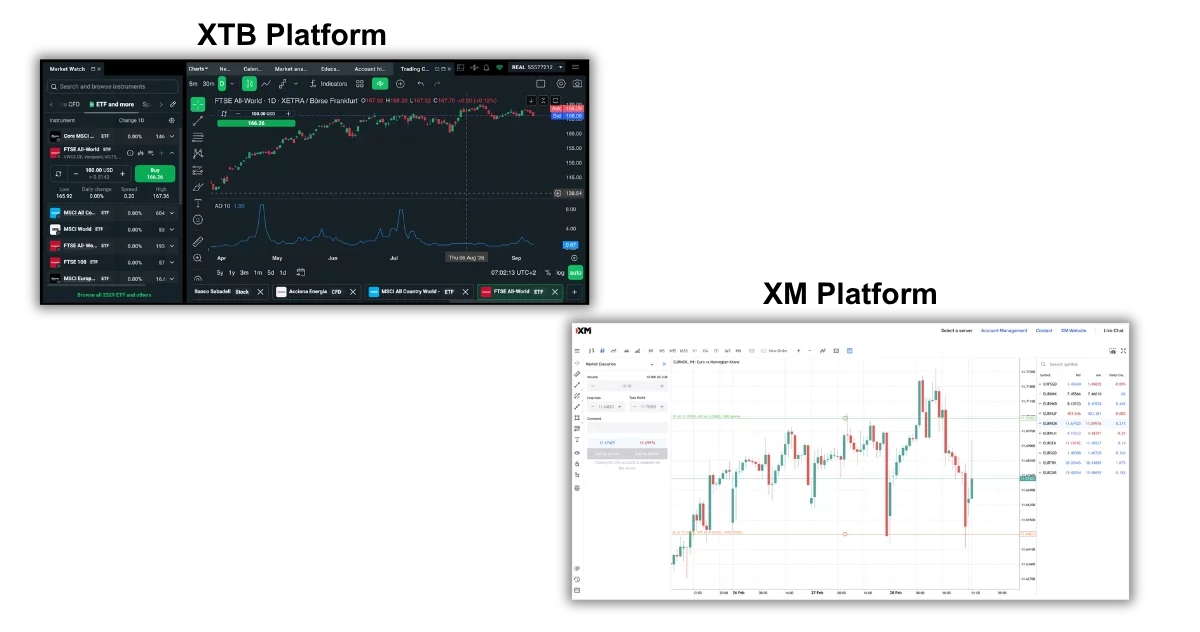
XTB’s xStation 5 is more polished for traders who prefer one simple in-house platform. In our order-entry checks, its instrument search, market and pending orders, trailing stops, GTC/GTT controls, calculator, sentiment heatmaps, stock screener, economic calendar, and custom news feed were easy to find and use.
XTB expanded mobile convenience with iOS, Android, and smartwatch support. However, its removal of MT4 means there is no MetaTrader, cTrader, or TradingView connection, which creates a real limitation for algorithmic and third-party-tool users.
Research
Research quality is closely contested, though XM has a slight edge for trader-focused analysis. It combines daily market updates, technical and fundamental reports, an economic calendar, and Trading Central ideas that can help identify short-term setups.
When we reviewed the research journey from a market headline to a trade idea, XM’s reports explained price moves in plain language and gave useful context around economic events. Its gap is that Trading Central is not fully integrated into the mobile app, forcing mobile-first users to move between tools.
XTB provides useful in-house research through xStation 5, including market news, event-impact markers, stock fundamentals, a Stocks Scanner, and a heatmap. The scanner was particularly helpful for narrowing a large stock list by chosen criteria rather than scrolling through thousands of names.
XTB’s economic calendar and company data, including market cap, EPS, and P/E ratios, are good for blending technical and fundamental views. It would be stronger with third-party tools such as Autochartist or Trading Central, which XM already supplies through its research offer.
Education
XM provides the more complete learning service. Its education includes live webinars seven days a week, 77 presenters, sessions in 20+ languages, Tradepedia videos, podcasts, XM Community content, and live education events.
We worked through more than 20 education and research resources to see whether the material was useful beyond the first lesson. XM’s regular webinar schedule and range of formats make it easier to keep learning after opening an account, although structured progress tracking, quizzes, and a clear glossary would improve the experience.
XTB offers clear beginner guides, strategy articles, trading videos, and platform tutorials built into xStation 5. That in-platform placement is useful when a trader needs help while looking at a chart rather than searching a separate website.
The weakness is content freshness and organisation. Some XTB live-workshop videos date back to 2021, and the lack of filters by experience level makes it harder for an intermediate trader to skip basic lessons.
Customer Support
XM has the more available support service, with 24/7 phone, email, and live chat in more than 30 languages. This is a clear advantage for traders outside normal weekday market hours.
In support checks covering account types and leverage changes, XM’s chat replies were prompt and clear, while email responses gave practical step-by-step instructions. Quality can vary by language and channel, however, so complex cases may not receive the same speed or depth everywhere.
XTB offers phone, email, live chat, social-media contact, and a dedicated account manager, with service available 24/5. Its live-chat replies were quick and professional during business hours, but the lack of weekend coverage is a drawback when a payment or login issue appears outside the working week.
XM also strengthened its trader community through its Singapore Telegram hub. XTB’s dedicated manager is valuable for personal account questions, but XM’s longer hours and broader language coverage better suit a global client base.
Is XTB or XM Better For Beginners?
XM is the better fit for most beginners because it combines a $5 minimum deposit, Micro accounts with smaller trade sizes, a $10,000 demo account, detailed education, and 24/7 multilingual support. Its webinars and simple MT4 setup give new traders plenty of help after the first deposit.
XTB is also beginner-friendly thanks to its no-minimum-deposit policy and intuitive xStation 5 platform. Still, the four-week demo limit, older workshop content, and weekday-only support make it slightly less forgiving for someone learning at a slower pace.
Is XTB or XM Better For Experienced Traders?
XM is the stronger option for experienced traders who need MT4 or MT5, Expert Advisors, VPS hosting, MultiTerminal, and TradingView Charts. Its MT5 platform offers 80+ analysis tools, and eligible traders can receive a free VPS when they meet the required balance and trading volume.
XTB’s xStation 5 is fast, clean, and packed with practical built-in tools, but it does not support MetaTrader, cTrader, or TradingView. That limits algorithmic workflows and third-party integrations, even though its direct-share and ETF offering is better for experienced investors.
Is XTB or XM Better For Short-term Traders?
XM is the better choice for many short-term traders because its Ultra Low account starts from 0.8 pips with no commission, and MT4/MT5 support automated systems, VPS use, and advanced order handling. The combination is useful for traders who scalp, day trade, or run rule-based strategies.
XTB remains competitive for manual CFD trading, with EUR/USD spreads around 1.0 pip in peak hours and a strong order ticket with trailing stops and GTC/GTT controls. However, fixed leverage settings and the lack of external platforms can make risk control and automation less flexible for fast-moving strategies.
Is XTB or XM Better For Long-Term Traders?
XTB is the better long-term choice because it provides real stocks, real ETFs, commission-free stock and ETF trading up to €100,000 per month, interest on uninvested cash, and automated Investment Plans. Its plans can now combine shares and ETFs, offering access to 3,400+ stocks and 1,800+ ETFs.
XM’s Shares Account can suit investors in supported regions, but its main strength remains CFD trading. It lacks ETFs, bonds, idle-cash interest, and a comparable automated portfolio tool, while both brokers charge inactivity fees on dormant accounts.
Is XTB or XM Better For Trading On Mobile?
XM is the better all-round mobile choice thanks to its easy account controls, copy trading, watchlists, real-time notifications, market insights, and access to the wider MT4/MT5 ecosystem. Its mobile experience also benefits from the broader platform upgrades around TradingView Charts and XM AI.
XTB’s mobile app is excellent for investors who want to monitor Investment Plans and use automatic allocation, and smartwatch support is a rare extra. Yet XM offers more tools and flexibility for active mobile traders, while XTB’s app is tied to its in-house platform only.
Why Pick XTB Over XM?
Pick XTB if you want a listed broker with a transparent corporate profile, a simple proprietary platform, and wider investment choices. It is especially attractive for real stocks, ETFs, Investment Plans, interest on idle cash, and access to over 11,800 instruments.
XTB is also a strong choice for traders who value a clean web and mobile experience over MetaTrader complexity. Its xStation 5 search tools, stock scanner, heatmaps, calendar, and portfolio dashboard make it easy to move from market research to trade execution.
Why Pick XM Over XTB?
Pick XM if you want flexible account types, a $5 starting deposit, MT4 and MT5, copy trading, VPS access, and 24/7 support. Its Micro and Ultra Low accounts are particularly useful for small-account traders and those who want lower-spread, commission-free trading.
XM is also the better fit for traders who want frequent learning support and third-party analysis. Seven-day webinars, 20+ languages, Trading Central, and automated-trading tools provide a stronger setup for developing and testing active trading strategies.
Compare XTB and XM Details
|
XTB
|
XM
|
|
|---|---|---|
Founded in 2002 in Poland, XTB now serves over 1 million clients. This forex and CFD broker offers a regulated trading environment with a wide range of assets and a commitment to trader satisfaction, featuring an intuitive in-house platform with excellent tools for aspiring traders. | XM is a trusted global forex and CFD broker with over 20 million clients in more than 190 countries. Since 2009, it has offered low trading fees on 1000+ instruments. XM provides a full MetaTrader experience that we have tested firsthand. 100% deposit bonus + further offers up to $4500100% deposit bonus + further offers up to $4500 | |
| Payment Methods | Credit Card, Debit Card, Maestro, Mastercard, Neteller, PayPal, Paysafecard, Skrill, Visa, Wire Transfer | Airtel, Apple Pay, Credit Card, Debit Card, Google Wallet, M-Pesa, Neteller, Perfect Money, Skrill, TransferWise, Visa, Wire Transfer |
| Account Currencies | USD, EUR, GBP | USD, EUR, GBP, JPY, ZAR |
| Trustpilot Score | ||
| App Review | Year after year, XTB's app stands out for its sleek design and clear interface. It’s fast, responsive, and full of useful features like integrated sentiment data, market news, economic calendars, and educational resources. The user-friendly order panel below the trading chart makes placing trades, including setting take profit and stop loss levels, straightforward. | provides a mobile app for Android and iOS, optimized for each platform. The app offers MT4 and MT5 software, giving full access to over 1,400 instruments. It is reliable with minimal glitches or delays. Features like built-in news, a trading journal, and push notifications provide all necessary trading tools. |
| Awards |
| |
| Margin Rate | 4.5% | |
| Account Types | STP | STP |
| Robo Advisor | ✗ | ✗ |
| Market Maker | ✓ | ✓ |
| P2P Trading | ✗ | ✗ |
| Spot Trading | ✓ | ✓ |
| Copy Trading Platform | XM provides copy trading through its user-friendly app, featuring exclusive crypto pairs. XM global also offers a built-in signals service on the MT5 platform. Traders can access detailed performance metrics and replicate the trades of strategy managers. The setup is straightforward, requiring just a few steps after logging into your MQL5 community account. | |
| Trade Signals | ✗ | ✓ |
| Tournaments | ✗ | ✓ |
| Demo Competitions | ✗ | ✓ |
| Ethical Investing | ✓ | ✗ |
| Custodial Account | ✗ | ✗ |
| Guaranteed Stop Loss | ✗ | ✗ |
| Islamic Account | ✓ | ✓ |
CFD Trading | ||
XTB provides a wide range of CFDs, including forex, indices, commodities, stocks, ETFs, and cryptos (depending on location). EU and UK clients get leverage up to 1:30, while global and pro clients can access up to 1:500. XTB excels in CFD trading resources and tutorials for short-term strategy development. | XM provides CFD traders with flexible leverage and a wide range of markets, including custom indices for sectors like artificial intelligence. The MT4/MT5 platforms are fast and reliable, and traders using algorithmic strategies can access a free VPS. | |
| Leverage | 1:5001:30 | 1:10001:30 |
| FTSE Spread | 1.8 | 1.4 |
| GBPUSD Spread | 1.4 | 0.8 |
| Oil Spread | 0.03 | 0.03 |
| Stocks Spread | 0.2% | 1.79 (Apple) |
Forex Trading | ||
XTB offers access to over 60 currency pairs with low spreads, averaging about 1 pip on major pairs. The xStation platform is user-friendly for forex traders, featuring advanced charting tools with 30+ indicators and various order types to support different strategies and risk management. | XM provides a wide range of currency pairs with no re-quotes or hidden fees. Spreads now start at 0.6 pips on the EUR/USD in the commission-free account. | |
| Assets | 70+ | 55+ |
| Currency Indices | USD | |
Cryptocurrency Trading | ||
XTB provides over 50 different digital currencies to trade, such as BTC where the spread starts from 0.22%, and the leverage can go up to 1:5. The xStation platform also offers a variety of trade pairs, including ETH/BTC and DSH/BTC. Traders can trade cryptocurrencies anytime with XTB's transparent and secure accounts. | XM offers a limited range of cryptocurrency CFDs against the USD through its South African entity. Traders can access Bitcoin, Ethereum, and Ripple with leverage up to 1:500. Its selection is smaller than the 100+ crypto derivatives offered by some competitors. | |
| Crypto Coins | ADA, BTC, BCH, DSH, EOS, ETH, IOTA, LTC, NEO, XRP, XLM, TRX, XEM, XLM, XMR, DOGE, BNB, LINK, UNI, DOT, XTZ | BTC, ETH, LTC, XRP, BCH |
| Crypto Lending | ✗ | ✗ |
| Crypto Mining | ✗ | ✗ |
| Crypto Staking | ✗ | ✗ |
| Auto Market Maker | ✗ | ✗ |
 Interactive Brokers
  NinjaTrader
  eToro USA