 Top Lists for USA
How To Use XTB
XTB uses its own platform, xStation 5, which is available on web and mobile. All versions work in a similar way. MetaTrader is no longer supported. Here is how we went from signing up to making our first trade.
 Written By
Christian Harris
Christian is a seasoned analyst, leveraging his expertise in stocks, forex, and crypto to evaluate brokers worldwide. With hands-on trading experience and a strong focus on risk management, he helps traders find reliable platforms. Christian's work for BrokerListings.com has been cited in the Financial Times.
Christian Harris Profile Page Fact Checked By
Tobias Robinson
Tobias is committed to helping traders find the right brokerage for their needs. He has tested 200+ brokers, spent 2,600+ hours using different platforms, and placed 2,100+ trades.
Tobias Robinson Profile Page Edited By
James Barra
James is an experienced broker analyst with a background in financial services. He has spent 2,500+ hours testing brokers, used 35+ different platforms and apps, audited 120+ broker T&Cs, and verified 300+ regulatory licenses. James has also been on US and UK TV, and been a guest on finance podcasts, discussing reports conducted by BrokerListings.com and sharing his expertise.
James Barra Profile PageJune 22, 2026
Step 1 — Open and Verify
- Pick your country. This sets your branch and your leverage caps.
- Answer the appropriateness questions. That’s a legal step, not a formality.
- Upload ID and proof of address.
The entire process is online, and our account was verified within a day. There is no minimum deposit, so you can start with a small amount or use the demo account. We funded an XTB account with a debit card, and the money arrived immediately with no fee.
Step 2 — Learn the Layout
xStation 5 uses panels you can drag around. These are the four we keep open:
| Panel | What it does | Why we use it |
|---|---|---|
| Market Watch | Searchable instrument list | Fastest way to find a ticker. Type “EURUSD” or “Apple”. |
| Chart | TradingView-style charting | Drawing tools, indicators, multiple timeframes. |
| Order ticket | Place and change trades | Where you set size, stop loss, take profit and order type. |
| Calendar | News and dividend events | Keeps news and ex-dividend dates from catching you out. |
Step 3 — Place a Trade
- Open Market Watch’, search for the instrument, and double-click to open the order ticket.
- Choose Buy (long) or Sell (short).
- Set your trade size in lots. The built-in calculator displays the margin, pip value, and commission before you confirm the trade. It is a good idea to use this tool every time.
- Choose an order type. Options include Market, Limit, Stop, Stop-Loss/Take-Profit, and Trailing Stop. You can also set expiry with Good-til-Cancelled (GTC) and Good-til-Time (GTT). Tip: Add a stop loss and take profit on the same ticket, not after.
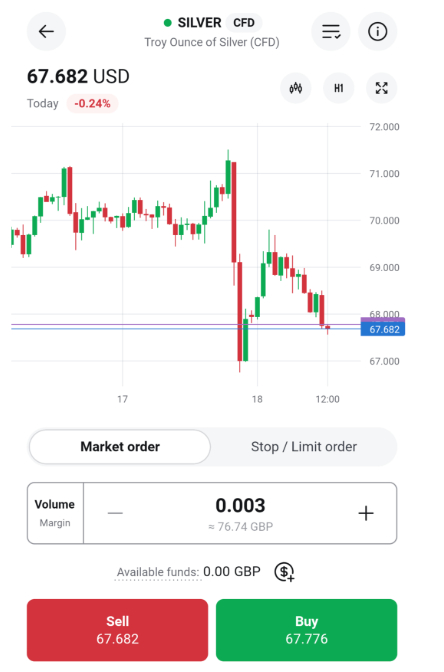
Using the XTB app is intuitive even for new users
Step 4 — Manage and Watch
- The bottom panel shows open trades, pending orders, and your full history.
- Set push, email, or SMS alerts for price levels and margin calls.
- The platform includes free audio market commentary, a paid feature on some other platforms.
Step 5 – Getting Money Out
Withdrawals at XTB are sent to a verified bank account. In our tests, the funds were transferred within three business days.
Keep in mind there is an inactivity fee: if you do not trade for 12 months, XTB charges $10 per month until you trade again or your balance reaches zero.
Handy Bits for New Users
- Education is built in. Videos and tutorials sit inside the platform, so you don’t have to leave to learn.
- Stock Scanner and Heatmap. Filter shares by fundamentals, or spot sector moves at a glance.
- Try the demo account first. You receive €100,000 in virtual funds, but the demo expires after four weeks. This may be too short if you want to test the platform for a longer period.