 Top Lists for USA
PU Prime App Review
The PU Prime app is a central part of the offering, not an afterthought. One thing to flag up front: availability is region-gated. Depending on where you are, you may not find the app in your local App Store or Google Play. When the stores don’t show it, the broker points you to a direct APK download from its website or to the browser-based PU Web Trader. We used the app across both funding and trading and rate it among the better proprietary apps we’ve handled.
 Written By
Christian Harris
Christian is a seasoned analyst, leveraging his expertise in stocks, forex, and crypto to evaluate brokers worldwide. With hands-on trading experience and a strong focus on risk management, he helps traders find reliable platforms. Christian's work for BrokerListings.com has been cited in the Financial Times.
Christian Harris Profile Page Fact Checked By
Tobias Robinson
Tobias is committed to helping traders find the right brokerage for their needs. He has tested 200+ brokers, spent 2,600+ hours using different platforms, and placed 2,100+ trades.
Tobias Robinson Profile Page Edited By
James Barra
James is an experienced broker analyst with a background in financial services. He has spent 2,500+ hours testing brokers, used 35+ different platforms and apps, audited 120+ broker T&Cs, and verified 300+ regulatory licenses. James has also been on US and UK TV, and been a guest on finance podcasts, discussing reports conducted by BrokerListings.com and sharing his expertise.
James Barra Profile PageOctober 7, 2026
What The App Does Well
The design is clean and modern, mirroring the web platform’s look, so switching between the two feels natural. Inside, you get:
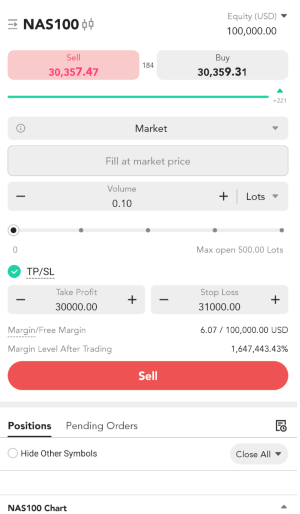
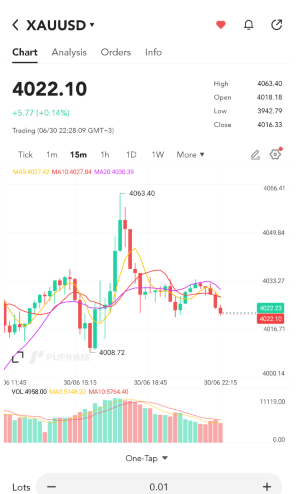
- Real-time charts with technical indicators and customizable order tickets. Zooming in and out of charts and overlaying indicators and even lines was smooth during testing.
- Copy trading at PU Prime is built directly into the app, including the provider marketplace and risk controls. Take profit and stop loss orders are particularly easy to configure with your fingers using the ‘+’ and ‘-‘ buttons or manual entry.
- Instant deposits through the Client Portal.
- MT4 and MT5 compatibility, so you can run MetaTrader strategies alongside the in-house tools if you download the standalone MetaTrader apps and connect your PU Prime account.
The PU Prime app has been updated regularly through 2025 and 2026, including onboarding tweaks and copy-trading upgrades, showing that the broker continues to invest in mobile.
Our Take
In our hands, the order tickets were responsive, and execution was quick, with no freezes during the sessions we ran. The instrument menu, charts, and price data all sit within a swipe or two.
If we’re nit-picking, the sheer breadth of the PU Prime ecosystem (app, web trader, MT4, MT5, copy trading, PU Community) can feel like a lot to take in at first. It’s a platform that rewards traders who want options more than those who want one ultra-simple screen. This means more casual traders and beginners could feel overwhelmed compared to some of the other top-rated trading apps we’ve evaluated.
How To Download The PU Prime App
- Open the App Store (iPhone) or Google Play (Android) and search for PU Prime.
- Install the free app.
- Tap Register to create an account, or log in if you already have one.
- Complete KYC by uploading your ID, then fund your account to start trading.
If the store says the app isn’t available in your country (e.g. in the UK), Android users can sideload the APK straight from PU Prime’s site:
- On your Android phone, open Settings > Security and turn on Install unknown apps for the browser you’ll use.
- Go to the PU Prime website and tap the Download App link, or open the APK directly.
- Open the downloaded PUPRIME.apk file and confirm the installation.
- Launch the app, then register or log in and complete KYC as above.
Two caveats with the APK route: only download it from PU Prime’s own domain, since fake broker APKs are a known scam vector, and a sideloaded app won’t auto-update through the store, so you’ll need to repeat the download when a new version lands. On iPhone, where sideloading isn’t an option, use the browser-based PU Web Trader instead.