 Top Lists for USA
How To Connect IC (Previously IC Markets) To TradingView
There are two different setups and ways to connect IC.com to TradingView, each with its own purpose. Native TradingView (for manual traders) works through IC’s Raw Trader account. Automated trading with TradingView alerts needs a third-party webhook bridge. Many online guides mix these up, but you should keep them separate.
 Written By
Christian Harris
Christian is a seasoned analyst, leveraging his expertise in stocks, forex, and crypto to evaluate brokers worldwide. With hands-on trading experience and a strong focus on risk management, he helps traders find reliable platforms. Christian's work for BrokerListings.com has been cited in the Financial Times.
Christian Harris Profile Page Fact Checked By
Tobias Robinson
Tobias is committed to helping traders find the right brokerage for their needs. He has tested 200+ brokers, spent 2,600+ hours using different platforms, and placed 2,100+ trades.
Tobias Robinson Profile Page Edited By
James Barra
James is an experienced broker analyst with a background in financial services. He has spent 2,500+ hours testing brokers, used 35+ different platforms and apps, audited 120+ broker T&Cs, and verified 300+ regulatory licenses. James has also been on US and UK TV, and been a guest on finance podcasts, discussing reports conducted by BrokerListings.com and sharing his expertise.
James Barra Profile PageOctober 7, 2026
| Method | Account Needed | Best For | Extra Cost? |
|---|---|---|---|
| Native TradingView | Raw Trader (may vary by entity) | Manual traders who prefer TradingView charts over MT5 | None |
| Webhook bridge | MT4 or MT5 | Algo traders automating Pine Script strategy alerts | Bridge subscription (~$15–30/mo) |
Alternatively, you can use TradingView charts and trade manually. Essentially, you use TradingView for analysis and execute in IC’s MetaTrader separately. It’s not a perfect workflow but it’s a back-up to the options above.
Option A: Native TradingView Connection (Manual Trading)
Account required: Raw Trader Plus (available on the Seychelles entity). This is IC’s native TradingView integration, so you can trade directly from TradingView charts using IC execution.
- Log in to your account at TradingView.
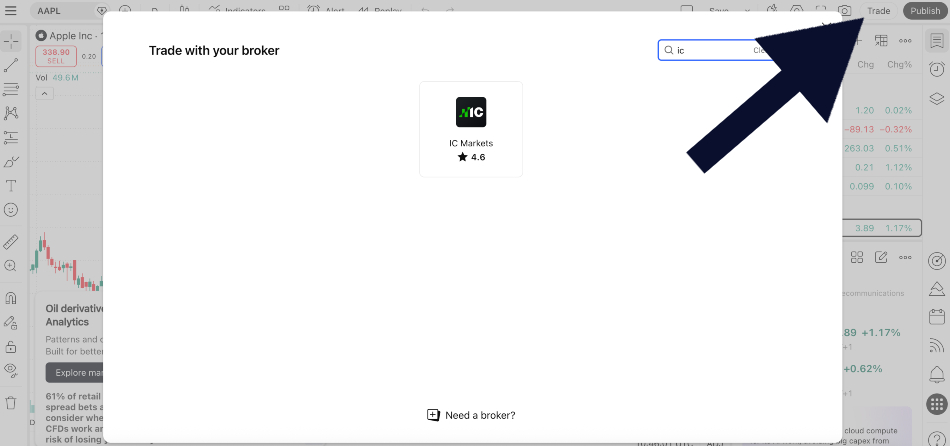
- Open any chart and click the ‘Trade’ button at the top of the screen. We did this and you can see the screen it brought up below.
- Search for ‘IC’, ‘IC.com’, or ‘IC Markets’.
- Enter your IC account credentials when prompted.
- A green ‘Connected’ status appears — you can now place orders directly from the chart.
What you get: real-time IC quotes on TradingView charts, one-click order entry, a live P&L panel, and access to TradingView’s full indicator library and Pine Script tools. You also get IC tight spreads and commission rates.
Option B: Automated Trading Via Webhook Bridge
Account required: Any IC MT4 or MT5 account. Best suited to algo traders running strategy alerts on TradingView.
TradingView does not send orders directly to MT4 or MT5. You need a cloud-based bridge service, such as WebhookTrade, which is the most commonly used. Here is how it works:
- Create an IC MT4/MT5 account and note your account number, trading password, and server name.
- Sign up for a webhook bridge service and enter your MT4/MT5 credentials — the bridge connects to your account in the cloud (your PC doesn’t need to be on).
- In TradingView, create an alert on your strategy — set the alert action to ‘Webhook URL’ and paste the bridge endpoint.
- In the alert message body, paste the JSON trade command from your bridge provider (specifies instrument, direction, lot size).
- When the alert fires, the bridge translates it into a market order on your IC.com MT4/MT5 account.