

How To Trade On Exness
Placing your first trade at Exness is simple, but setting up correctly first can save you money later. Here’s the order we suggest for a new Exness account, from sign-up to making trades.
 Written By
Christian Harris
Christian is a seasoned analyst, leveraging his expertise in stocks, forex, and crypto to evaluate brokers worldwide. With hands-on trading experience and a strong focus on risk management, he helps traders find reliable platforms. Christian's work for BrokerListings.com has been cited in the Financial Times.
Christian Harris Profile Page Fact Checked By
Tobias Robinson
Tobias is committed to helping traders find the right brokerage for their needs. He has tested 200+ brokers, spent 2,600+ hours using different platforms, and placed 2,100+ trades.
Tobias Robinson Profile Page Edited By
James Barra
James is an experienced broker analyst with a background in financial services. He has spent 2,500+ hours testing brokers, used 35+ different platforms and apps, audited 120+ broker T&Cs, and verified 300+ regulatory licenses. James has also been on US and UK TV, and been a guest on finance podcasts, discussing reports conducted by BrokerListings.com and sharing his expertise.
James Barra Profile PageJuly 7, 2026
Getting Started At Exness: Step-By-Step
- Create an account. Sign up with your email and password, then choose a Demo or Live account. If you choose a live account, you’ll then need to confirm a telephone number and upload proof of identity and address. Our documents were approved in less than a day. You won’t be able to deposit or withdraw in full until you complete verification.
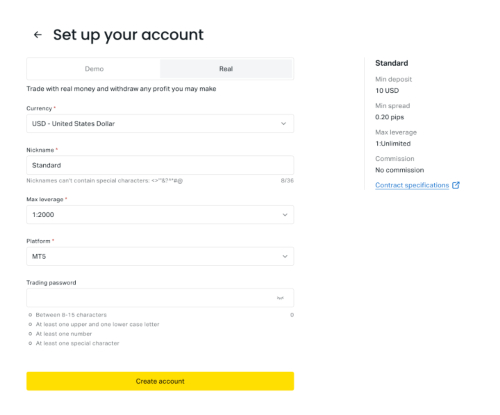
- Choose the right account type. From the Personal Area, click Open Account. Standard is best for most beginners, with a $10 minimum and no commission. Standard Cent lets you trade micro-lots, making it good for practice with low risk. Pro, Raw Spread, and Zero are considered ‘Professional’ accounts and are aimed at scalpers and high-volume traders who want tighter pricing. Check Exness minimum deposits by account.
- Set your currency, leverage, platform, and fund your account. You can adjust leverage from the client area, even up to very high levels on the offshore entity, without needing support. Start with a conservative setting. High leverage increases both gains and losses, and a 1:2000 setting can wipe out your account with one bad trade.
- Pick a platform. MT4, MT5, and the browser-based Exness Terminal all use the same account. The Terminal is the easiest place to start because it uses TradingView charts and doesn’t require installation. Alternatively, check our guide to connecting Exness to MetaTrader.
- Create an order. To open a position in MT4 or MT5, go to Market Watch, right-click an instrument like EUR/USD, select New Order, set your lot size, then buy or sell at market or set a pending order at your chosen price. We’ve placed multiple trades on FX, metals and stocks on Exness – it’s intuitive.
- Risk management. Protect your trade by adding a stop-loss and take-profit before you confirm the order. Exness’ platforms support both of these tools. This habit helps successful traders manage risk.
- Manage and close your trades. Adjust your stop levels as prices change, and close trades manually or let your stop-loss or take-profit do it for you. Run everything above on the Exness demo account first. It comes loaded with virtual funds you can top up, and it uses the same servers as a live account, so the execution feel is identical. Once you’ve placed 10 demo trades and understand position sizing, switch to real money with an amount you’re comfortable losing.
To give you an idea of what’s available, a Standard account lets you trade over 100 currency pairs, plus gold, other metals, crypto CFDs, indices, energies, and about 100 share CFDs. In our live tests of Exness, market orders were filled almost instantly on major pairs during busy hours, with slippage only showing up around news events. You can start with positions as small as 0.01 lots, so you can keep your early trades small while you learn.