 Top Lists for USA
How To Trade On XM
Trading on the XM web platform is intuitive, taking six steps to go from firing up the terminal to placing a trade with clear risk management parameters.
 Written By
Christian Harris
Christian is a seasoned analyst, leveraging his expertise in stocks, forex, and crypto to evaluate brokers worldwide. With hands-on trading experience and a strong focus on risk management, he helps traders find reliable platforms. Christian's work for BrokerListings.com has been cited in the Financial Times.
Christian Harris Profile Page Fact Checked By
Tobias Robinson
Tobias is committed to helping traders find the right brokerage for their needs. He has tested 200+ brokers, spent 2,600+ hours using different platforms, and placed 2,100+ trades.
Tobias Robinson Profile Page Edited By
James Barra
James is an experienced broker analyst with a background in financial services. He has spent 2,500+ hours testing brokers, used 35+ different platforms and apps, audited 120+ broker T&Cs, and verified 300+ regulatory licenses. James has also been on US and UK TV, and been a guest on finance podcasts, discussing reports conducted by BrokerListings.com and sharing his expertise.
James Barra Profile PageAugust 6, 2026
How To Place A Trade
- Choose an asset: Use the drop-down menu in the top left corner of the platform to search by asset class, such as forex, stocks, and indices. This will bring up a list of individual assets, such as EUR/USD, GBP/USD and USD/JPY under ‘Forex’. Alternatively, you can type in the asset after pressing the magnifying glass icon or you can use the pre-configured list, such as ‘Popular’, which contains most of the prominent assets a casual trader will use. Clicking an asset will bring up a price chart in the middle. As you can see below, we opted for Gold.
- Analyze: Use the charting analysis tools or other research to inform your trading decision. The XM web platform (plus MetaTrader) are well suited to technical traders owing to their dozens of technical indicators, including Bollinger Bands, wide selection of charting timeframes from 1M and chart types, including candlesticks. Drawing tools and annotations are also straightforward to overlay from the menu in the left and top of the chart.
- Choose your execution type: In the right, the platform order ticket allows you to select between instant market delivery and structured pending order placements. Market Orders instantly match your trade against the best available price on XM’s internal trading book. This helps with fast execution speed but exposes your entry to mild slippage during high-impact news releases or extreme market volatility. Limit Orders instruct the XM trading engine to only activate a buy order if the market falls to a specific target, or a sell order if the asset rallies to your exact target. This helps lock in your entry price quickly, but your order will remain unfilled if the market misses your price target. Stop Orders automatically convert your placement into a market order the instant a specific price threshold is breached. This order type is typically deployed to capture strong momentum breakouts past major support or resistance levels. For experienced, fast-paced traders needing to act quickly there’s also a ‘one click order’ button that can be toggled on in the top right corner.
- Calculate leverage, margin, and pip: Every market entry relies on leverage parameters and margin allocations. For XM accounts registered in top-tier jurisdictions such as CySEC or ASIC, the maximum retail leverage is legally capped at 1:30. Offshore accounts opened under the FSC Belize entity, however, can access significantly higher ratios up to 1:1000. It is crucial to calculate your precise pip value before opening a position. On a standard lot of a USD-backed currency pair, a one-pip movement (the fourth decimal place) represents a $10 value fluctuation. If the market shifts 40 pips against your position, you will face an immediate $400 equity drawdown. XM’s platform dynamically calculates these margin obligations, making it essential to maintain a healthy account cushion to prevent automated margin calls or position liquidations.
- Manage risk: XM’s Standard Stop Loss automatically requests execution to close your position at the next available market price once your trigger price is broken. During extreme news gaps or weekend rollovers, market prices can skip past your stop level, resulting in execution slippage. To protect profits on moving trends, you can implement a Trailing Stop that automatically follows a profitable trade by a fixed number of pips. Unlike alternative platforms that offer proprietary, fee-based insurance features (such as AvaTrade’s AvaProtect tool), XM relies solely on organic market order types and advanced risk controls across its ecosystem. To navigate volatile market openings safely, you should deploy defensive limit entries or use automated tracking scripts to limit execution slippage.
- Monitor, amend, and close active positions: You can access your position under the Trade tab (or select the chart order line) and click ‘X’ for a full market exit, or scale out partially by reducing the volume parameter on the order ticket. Stop Loss and Take Profit levels can be adjusted as you go by using the drag-and-drop on the chart. Just keep in mind that closing one side of a hedged position instantly reinstates full margin obligations on the remaining open leg under XM’s zero-requote model.
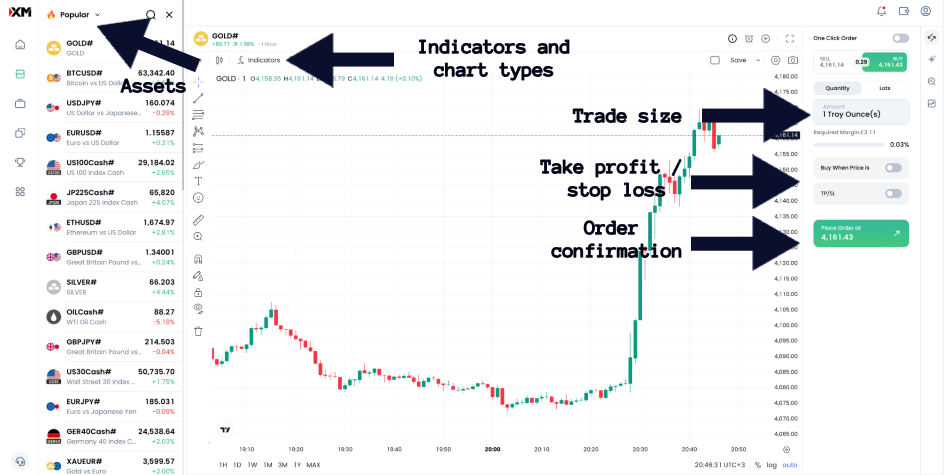
XM platform with key functions annotated
Tip: Trading with XM requires a clear understanding of its market-maker model. XM quotes its own bid/ask prices while maintaining a roughly 99% instantaneous order execution workflow with zero re-quotes.