What Is The Minimum Deposit At Pepperstone?
The entry baseline at Pepperstone is highly accessible at $0, but this can vary in practice depending on your location and chosen payment method.
 Written By
Christian Harris
Christian is a seasoned analyst, leveraging his expertise in stocks, forex, and crypto to evaluate brokers worldwide. With hands-on trading experience and a strong focus on risk management, he helps traders find reliable platforms. Christian's work for BrokerListings.com has been cited in the Financial Times.
Christian Harris Profile Page Fact Checked By
Tobias Robinson
Tobias is committed to helping traders find the right brokerage for their needs. He has tested 200+ brokers, spent 2,600+ hours using different platforms, and placed 2,100+ trades.
Tobias Robinson Profile Page Edited By
James Barra
James is an experienced broker analyst with a background in financial services. He has spent 2,500+ hours testing brokers, used 35+ different platforms and apps, audited 120+ broker T&Cs, and verified 300+ regulatory licenses. James has also been on US and UK TV, and been a guest on finance podcasts, discussing reports conducted by BrokerListings.com and sharing his expertise.
James Barra Profile PageOctober 7, 2026
What Is The Absolute Minimum Deposit?
Officially, Pepperstone has a $0 minimum deposit baseline across its standard retail account options. Unlike competitors that often require a rigid starting sum between $50 and $250, you can theoretically open and fund an account with any amount you choose, subject to payment method minimums. This zero-minimum rule applies equally across their Standard and Razor accounts, plus Swap-Free solutions in some regions.
However, from an execution standpoint, Pepperstone generally advises starting with at least $200. Because leverage parameters and underlying contract sizes require baseline margin allocations, trying to navigate live markets with just $10 or $20 leaves your account highly vulnerable to immediate stop-outs if an asset moves slightly against your position.
For completeness, we checked the minimum deposits at each of Pepperstone’s entities, and have noted any heightened deposit requirements based on the payment route:
« Make Full Width »| Entity | Key Regions | Minimum Deposit | Payment Method Minimums |
|---|---|---|---|
| Pepperstone Limited | United Kingdom | 0 GBP | Apple Pay, Google Pay and debit/credit cards: 10 GBP. Domestic and international bank transfers: 0 GBP. |
| Pepperstone Group Limited | Australia | 0 AUD | Domestic bank transfer, BPAY and PayID: 0 AUD. All other available deposit methods: 10 AUD. |
| Pepperstone GmbH | Germany and Austria | 0 EUR | Apple Pay, Google Pay, PayPal, and credit/debit cards: 10 EUR minimum. Bank transfers: €0. |
| Pepperstone EU Limited | European Economic Area, excluding clients served by Pepperstone GmbH | 0 EUR | Apple Pay, Google Pay, debit/credit cards and PayPal: 10 EUR. Bank transfers: €0. Availability may vary by country. |
| Pepperstone Financial Services (DIFC) Limited | Dubai International Financial Centre and eligible Middle Eastern clients | 0 USD | Visa and Mastercard: 10 USD. Mashreq Bank, Barclays Bank, Apple Pay and Google Pay: 0 USD. |
| Pepperstone Financial Services LLC | Mainland United Arab Emirates | 0 USD | Visa and Mastercard: 10 USD. Mashreq Bank, Barclays Bank, Apple Pay, Google Pay and cryptocurrency deposits: 0 USD. |
| Pepperstone Markets Kenya Limited | Kenya and eligible African clients | 0 USD or 0 GBP | Bank transfer: 0 USD or GBP equivalent. All other available deposit methods, including cards, Apple Pay, Google Pay, PayPal, Skrill, Neteller and M-Pesa: 10 USD or the account-currency equivalent. |
| Pepperstone Markets Limited | International clients not served through another local Pepperstone entity | 0 USD | No strict account minimum, but available methods and deposit minimums depend on the client’s country. |
Step-By-Step: How to Fund Your Account
To ensure your incoming transfer goes smoothly without hitting compliance flags, follow these steps:
- Complete Your Identity Check First: Finalize your profile verification before sending funds. In many regions, you must upload clear images of a state-issued identification card, along with a recent residence document, such as a utility or bank statement often issued within the past 3 or 6 months. We’ve been through it – it’s digital and straightforward.
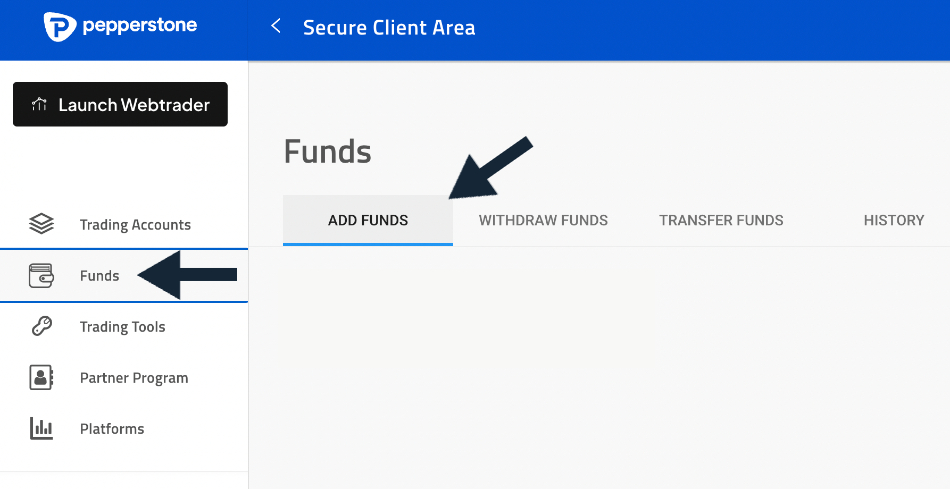
- Open the Secure Funding Area: Enter Pepperstone’s ‘Secure Client Area’ on your computer or open the app, select the ‘Funds’ menu, and choose ‘Add Funds’. Tip: Use a payment method that aligns with your primary account currency (such as USD, GBP, or EUR) to avoid unnecessary currency conversion markups.
- Follow the On-Screen Instructions: The exact process varies depending on the payment method chosen. For example, with a debit card, you will need to enter the card details. Pepperstone provides clear instructions for each payment option in the cashier portal. If you’re using web-enabled payment profiles or cards, ensure your security verification protocols (such as 3D Secure or app approvals) are fully active to clear the automated payment processor.