 Top Lists for USA
How To Withdraw From Pepperstone
Pulling capital from Pepperstone is a reliable, structured process, though it follows strict international AML directives. Skipping the basic rules of their withdrawal architecture can cause unexpected delays.
 Written By
Christian Harris
Christian is a seasoned analyst, leveraging his expertise in stocks, forex, and crypto to evaluate brokers worldwide. With hands-on trading experience and a strong focus on risk management, he helps traders find reliable platforms. Christian's work for BrokerListings.com has been cited in the Financial Times.
Christian Harris Profile Page Fact Checked By
Tobias Robinson
Tobias is committed to helping traders find the right brokerage for their needs. He has tested 200+ brokers, spent 2,600+ hours using different platforms, and placed 2,100+ trades.
Tobias Robinson Profile Page Edited By
James Barra
James is an experienced broker analyst with a background in financial services. He has spent 2,500+ hours testing brokers, used 35+ different platforms and apps, audited 120+ broker T&Cs, and verified 300+ regulatory licenses. James has also been on US and UK TV, and been a guest on finance podcasts, discussing reports conducted by BrokerListings.com and sharing his expertise.
James Barra Profile PageOctober 7, 2026
To ensure your request clears Pepperstone‘s auditing system without manual holds, follow this routine:
- Check Your Margin Positions: Evaluate your remaining exposure if you have active trades. Withdrawing capital lowers your equity base and can cause your margin levels to drop, potentially triggering automated position liquidations if the market swings. At Pepperstone, if you have open trades, you can only withdraw up to 90% of your free margin.
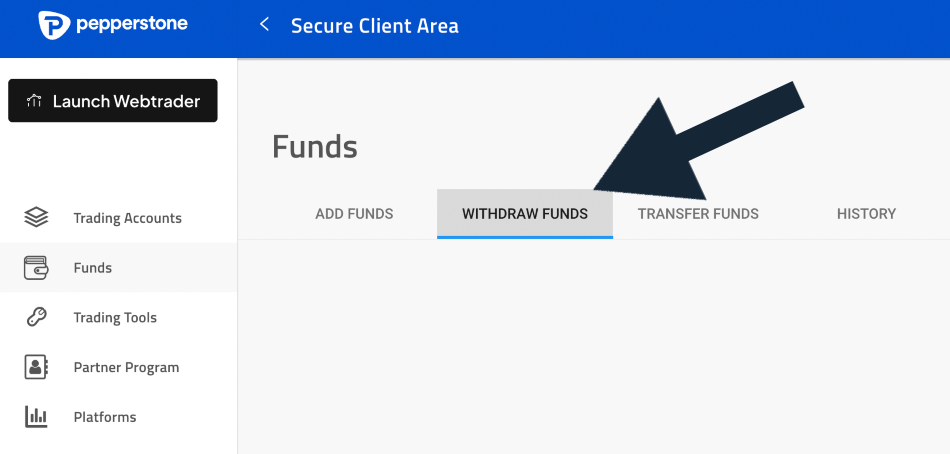
- Head to the Cashier Portal: Enter your client profile, click on the ‘Funds’ sidebar, and select the ‘Withdraw Funds’ tab. Choose the method that corresponds directly to your original funding path.
- Provide Destination Verification: Enter your desired payout amount. If you are sending your trading profits to a bank account for the first time, you will need to upload a clear bank document or digital statement confirming your ownership of that account.
- Confirm Payment: Pepperstone normally sends an email confirmation or 2FA code to verify the transaction. Submit this within an hour.
- Track the Status: Confirm the request. Your transaction will appear as “Pending” while it undergoes internal review, and you can view its progress in the history tab.
Pitfalls That Can Delay Pepperstone Withdrawals
- Unfinished Profile Verification (KYC): While you can browse platforms with a basic registration, Pepperstone will not authorize outbound capital transfers until your identity documentation is fully reviewed and approved.
- Third-Party Destination Restrictions: Pepperstone enforces a ban on third-party financial transfers. Attempting to move capital to a bank account or card that doesn’t match the legal name on your trading profile can trigger a compliance lock.
- The Corporate Business Hours Window: The specialized processing desk operates during standard corporate business hours (Monday through Friday). Withdrawal requests sent late on Friday or over the weekend will be placed in a queue until processing resumes on Monday morning.
- Not Completing 2FA: After hitting submit in the account portal, Pepperstone sends a confirmation email or require a Two-Factor Authentication (2FA) code. If you don’t click the email confirmation link within 1 hour, the request automatically expires and disappears from the system.
How Long Do Withdrawals Take At Pepperstone?
There is often a significant difference between marketing claims and actual execution times when retrieving your capital. In the UK, Pepperstone states that withdrawal requests received before 21:00 GMT are typically processed on the same business day, with timings varying in other regions.
We put this timeframe to the test in the real world. We established a live retail account, deposited capital, made several trades, and initiated two separate withdrawals to track transit times.
Test 1: Debit Card Pathway
- Request Logged: Tuesday at 08:30
- Broker Internal Clearance: Tuesday at 15:45 (Processed in under 8 hours)
- Funds Arrived in Account: Thursday at 10:15
- Total Elapsed Transit: ~50 hours (Roughly two banking business days)
Test 2: Verified E-Wallet Channel
- Request Logged: Thursday at 13:15
- Broker Internal Clearance: Friday at 09:30 (Cleared within business hours)
- Funds Arrived in Wallet: Friday at 10:00 (Near-instantaneous local delivery)
- Total Elapsed Transit: ~21 hours (Within one business day)
Our evaluation showed that Pepperstone consistently met its processing estimates. Most variations in overall transit time stem from external banking networks rather than from broker delays.
Withdrawal Timeline Breakdown By Method
The journey of your outbound capital is divided between the broker’s compliance check and external network clearance windows:
| Payment Method | Pepperstone Processing | Network Transit Window | Total Estimated Time |
|---|---|---|---|
| E-Wallets (PayPal / Neteller / Skrill) | Same Business Day | Near-Instant (Under 1 hour) | 24 Hours / 1 Business Day |
| Credit / Debit Cards (Visa / Mastercard) | Same Business Day | 1 to 5 Business Days | 2 to 5 Business Days |
| Domestic Bank Wire (e.g., Australia/UK) | Same Business Day | 1 to 3 Business Days | 1 to 3 Business Days |
| International Wire (SWIFT)* | Same Business Day | 3 to 5 Business Days | 3 to 7 Business Days |
*Pepperstone passes on international bank SWIFT fees of approximately $20 USD (or local currency equivalent) charged by intermediary banking institutions.
The “Closed-Loop” Policy
Like many regulated brokers, Pepperstone requires all financial payouts to match incoming channels up to the amount originally deposited. If you deposit $1,000 using a specific Visa profile and grow your balance to $1,500 , a total withdrawal request of $1,500 is split by the compliance desk:
- The first $1,000 is returned to the same Visa card as a direct refund.
- The extra $500 in trading profit is directed to an approved bank account or secondary payment channel matching your name.