

How To Change Leverage On Pepperstone
Some clients can change how much leverage they use in the Pepperstone account area, but to what degree depends on your location and account status, i.e. whether you’re registered as a retail or professional trader.
 Written By
Christian Harris
Christian is a seasoned analyst, leveraging his expertise in stocks, forex, and crypto to evaluate brokers worldwide. With hands-on trading experience and a strong focus on risk management, he helps traders find reliable platforms. Christian's work for BrokerListings.com has been cited in the Financial Times.
Christian Harris Profile Page Fact Checked By
Tobias Robinson
Tobias is committed to helping traders find the right brokerage for their needs. He has tested 200+ brokers, spent 2,600+ hours using different platforms, and placed 2,100+ trades.
Tobias Robinson Profile Page Edited By
James Barra
James is an experienced broker analyst with a background in financial services. He has spent 2,500+ hours testing brokers, used 35+ different platforms and apps, audited 120+ broker T&Cs, and verified 300+ regulatory licenses. James has also been on US and UK TV, and been a guest on finance podcasts, discussing reports conducted by BrokerListings.com and sharing his expertise.
James Barra Profile PageOctober 7, 2026
As a highly regulated broker, Pepperstone must enforce regional leverage restrictions set by local financial watchdogs, such as ESMA in Europe, FCA in the UK, and ASIC in Australia. Under these regimes, retail accounts are legally limited to a maximum cap of 1:30 on major currency pairs and 1:20 on major stock indices.
You can only access higher ratios if you qualify for professional classification (up to 1:500 leverage) or open an account under an offshore entity (up to 1:200 but not recommended if you’re in a tightly regulated local region). Remember that higher leverage simply decreases your upfront margin requirement per trade – it does not increase your actual capital, but it significantly elevates your risk exposure.
If you’re a client eligible to change their leverage with Pepperstone, follow these steps:
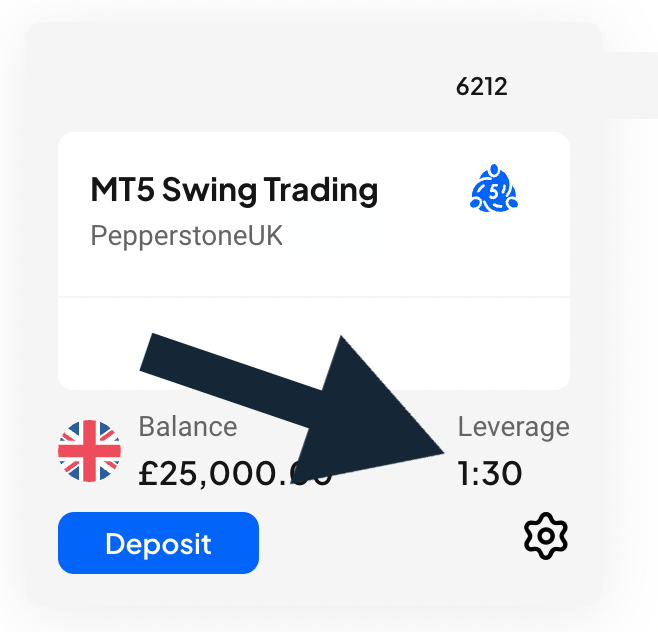
- Access Your Account Portal: To check your current settings or request a modification, log in to your main web-based client dashboard on the Pepperstone homepage. This administrative area is where all account adjustments take place. Once inside your main dashboard, navigate to the ‘Trading Accounts’ from the left-hand menu. Here, you will see individual summary cards for all your active trading profiles, with the leverage level shown in the bottom right corner like below.
- Modify Settings: If your Pepperstone account registration or demo setup allows manual leverage adjustments, review the account card you want to modify. Click the settings icon for that specific account number. Select the option labeled ‘Change Leverage’. A window will open showing a dropdown menu with available leverage options. Choose your preferred trading ratio and submit the update. The system will process your adjustment.
Upgrading To Professional Status
For retail traders operating under strict regional caps who wish to unlock higher leverage levels (up to 1:500 for specific assets at Pepperstone), you must formally apply for a Professional Trader Account. Locate the professional application link within your client profile settings to open the registration screen.
The platform will present the statutory regulatory criteria checklist. Generally, you must meet at least two of three core requirements: maintaining a significant financial asset portfolio, possessing documented professional experience within the financial sector, or demonstrating consistent high-volume trading activity over the past year.
Select the qualifying criteria, upload your supporting bank or brokerage statements, and submit the application for manual review by the compliance team.