 Top Lists for USA
Is Moomoo Good For Day Trading?
From our tests, which weighs 15 criteria and involved placing 25+ intraday trades, Moomoo is good for day trading. It scored 45/55 for day trading suitability.
 Written By
James Barra
James is an experienced broker analyst with a background in financial services. He has spent 2,500+ hours testing brokers, used 35+ different platforms and apps, audited 120+ broker T&Cs, and verified 300+ regulatory licenses. James has also been on US and UK TV, and been a guest on finance podcasts, discussing reports conducted by BrokerListings.com and sharing his expertise.
James Barra Profile Page Fact Checked By
Tobias Robinson
Tobias is committed to helping traders find the right brokerage for their needs. He has tested 200+ brokers, spent 2,600+ hours using different platforms, and placed 2,100+ trades.
Tobias Robinson Profile Page Edited By
William Berg
William Berg combines his expertise in law and finance to analyze trading brokers. He has checked 3,250+ regulatory licenses, investigated 2,365+ broker clones and trading scams, and placed 3,500+ trades.
William Berg Profile PageOctober 7, 2026
Day Trading Assessment
Below, we compiled the 15 features we consider important for active day traders, then investigated whether Moomoo offers them and to what degree, assigning the broker a score for each.
The total score available per metric varies, as some are more important for day trading than others. For example, Execution gets up to 5 points because it’s essential, while Hot Keys gets 3 points because it isn’t as make-or-break for intraday traders.
| Feature | Score | Details |
|---|---|---|
| 1. Charting | 4/5 | Excellent, differentiated package with 7 chart types in desktop platform (hollow candle, candle, bar, area, line, heiken ashi, four style candles), tick sessions available, 7 chart lines, hundreds of indicators counted in our tests, the ability to share charts in the Moomoo community. Responsive charts that are quick to annotate and configure in fast-moving markets. |
| 2. Customizable Platform | 2/3 | Strong customization in the desktop platform especially, including multi-chart views with up to 10 charts and the ability to resize charts and panels, and maximise the screen. Less flexible on the app and web terminal. Useful tools, including news, comments, AI assistant, intraday money flow, technical sentiment, short sale analysis, but they mainly need to be opened in separate widgets, with limited ability to add new panels alongside existing charts. |
| 3. One Click Trading | 3/3 | Yes – can be activated in profile settings in fewer than 5 clicks on the desktop platform. You can buy and sell in one click, cutting delays in fast markets. |
| 4. Hot Keys | 3/3 | Yes – 90+ hotkey settings, including ‘1/2 max to buy’, ‘switch to 1-min interval’, and ‘cancel all’ e.g. in unexpected market moves. We programmed 6 during our day trading tests of the Moomoo platform. |
| 5. Automated Trading | 4/5 | Ability to create algo strategies without code via the ‘Algo’ tab in the left menu on the desktop platform, as well as via Python. Suits beginners and advanced traders. Straightforward to configure triggers during testing, e.g. we created a setup that looked at EMA technical patterns over 1-hour timeframes in US securities. |
| 6. Advanced Order Types | 3/3 | Basic orders from take-profit and stop-loss through to one-cancels-the-other, trailing stops/limits, and market-if-touched. You can also configure advanced orders so e.g. bracket orders can be triggered automatically using hot keys. |
| 7. API | 3/3 | Access to real-time quotes, Level II order book depth, historical chart data, full order management. API Skills also facilitate AI agents like Claude to be connected to the Moomoo environment. What makes it strong is that intraday strategies and commands can be set up in natural language, removing the coding learning obstacle. |
| 8. VPS | 1/3 | Moomoo does not offer or sponsor its own VPS. A self-hosted VPS setup via OpenD is the workaround, allowing you to connect Moomoo with a third-party VPS provider. |
| 9. Execution | 4/5 | Fast and reliable order execution during tests. Orders went through predominantly at expected prices without delays. But Moomoo does not publish average monthly execution statistics. |
| 10. Slippage | 3/5 | Low slippage in tests, though slippage increased during out-of-hours trades. Moomoo does not publish the percentage of orders executed at desired prices. Negative slippage is possible. |
| 11. Raw Spreads | 2/3 | No ECN-style spreads from 0.0 pips with spreads primarily from public exchanges with no Moomoo mark-up. Spreads are competitive and clearly displayed in the desktop platform and app prior to executing a day trade. |
| 12. Commissions | 3/3 | Varies by product and region, but primarily uses a commission-free model, including no commission on US stocks and ETFs. Moomoo also removed commissions on equity options. Competitive pricing overall, though some additional regulatory, exchange and subscription fees can apply. |
| 13. Extended Hours Trading | 3/3 | Pre and post-market sessions, 24/5 trading on select US stocks and ETFs from Sunday to Friday, with 500+ assets including SpaceX and Nvidia. You can select the pre/post market session in the ‘Session’ drop-down in the order ticket, but there’s no short selling during extended hours. |
| 14. Level II Data | 3/3 | Real-time level II data with up to 60 price levels refreshed every 0.3 seconds. Level II data is available on the desktop platform and app. In the app, ‘Order Book’ is under the chart and you can configure color stripes, order size bar and depth chart. On desktop, order book is under ‘Quotes’, and you can switch from e.g. ‘Nasdaq Basic BBO’ to ‘Overnight BBO’. |
| 15. Margin Trading | 4/5 | Yes, but maximum retail leverage can vary by user, product, and region, but is generally up to 1:2 in the US, Hong Kong, Singapore and Australia (in line with or below regulatory caps). Margin rates are competitive, undercutting many legacy brokerages, though trailing some alternatives, notably Interactive Brokers. |
| Total | 45/55 | 82% mark for day trading overall. |
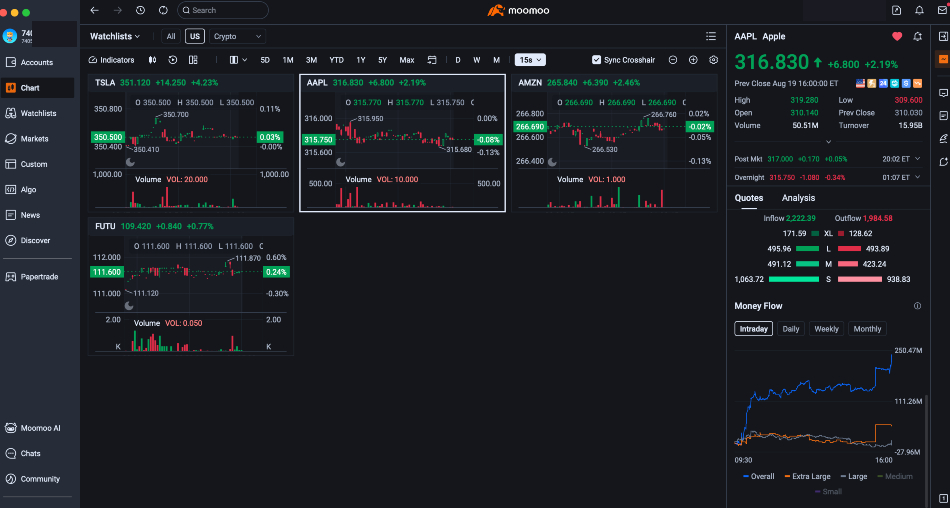
Multiple chart view
My Day Trading Experience During Testing
To assess the day trading experience, I rolled up my sleeves and placed over 25 day trades on the Moomoo desktop platform and mobile app during extended hours sessions and regular market hours. I traded US stocks, including Nvidia, Hong Kong equities like Tencent, crypto ETFs, took buy/sell positions, and used various orders, including stop limit.
The desktop platform especially is impressive. It’s packed with features, market data, and tools that will genuinely support intraday traders, and I didn’t experience the technical glitches or frustrating user experiences I’ve seen on other platforms.
The Moomoo app is also feature-rich, though after hours of testing I ultimately found it too fiddly to run serious charting analysis – so I switched back to the desktop platform. I wouldn’t use it as my primary platform for intraday trading.
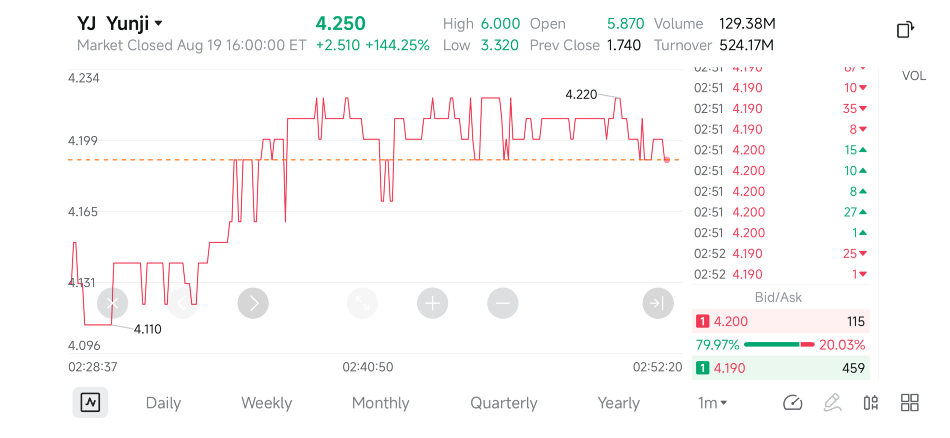
Moomoo app
The other catch for day traders is that Moomoo’s software comes with a significant learning curve for new clients. With the software design quite different to most other brokers, it took me three trading sessions before I started to feel like I had a good grasp of the features and to get the workspace configured in a way that ‘worked’ for me.
One tip to save time is to head to ‘Custom’ and select ‘Active Trader’ for a default workspace that’s got a clean mix of charts, order panels, and watchlists. Alternatively, chart-heavy traders may prefer the ‘Multi-Chart’ view, which can then be tweaked also.
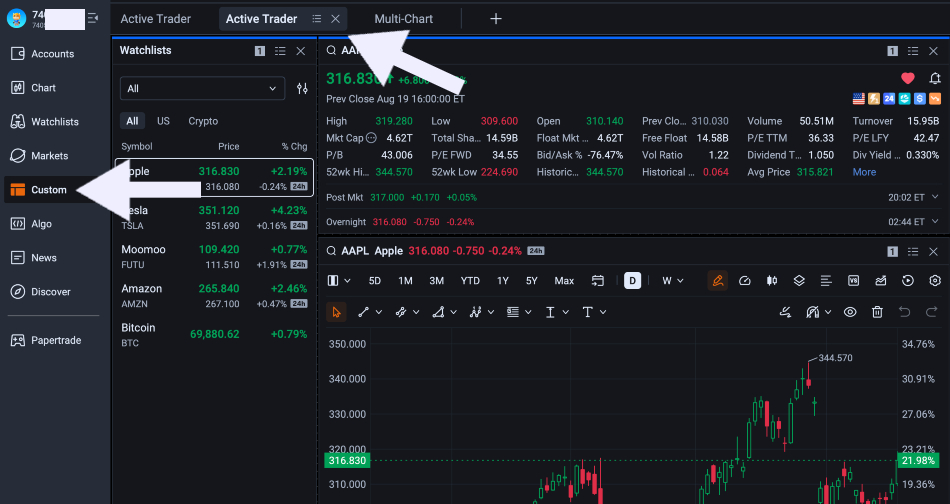
Desktop platform
Ultimately, Moomoo is a broker that can work for day trading – it’s got the tools, execution and competitive fees and margin trading conditions, you’ve just got to be willing to invest the time to get the most out of the software.
Testing note: I downloaded and used the Moomoo desktop software on a Macbook Pro and the broker’s app on an iPhone mobile device.
How Does Moomoo Treat Pattern Day Trading?
Moomoo no longer enforces the $25,000 pattern day trading (PDT) requirement in the US since FINRA adopted fresh intraday margin standards in April 2026.
Instead, they use an intraday margin level (IML) that tracks your account risk in real-time, considering your overall account exposure rather than just your trade frequency (it used to be a maximum of 4 trades in 5 days with under $25k would trigger PDT). As long as your IML remains positive, you can day trade without restrictions on Moomoo.
However, Moomoo also warns that while removing the legacy PDT requirement has lowered the entry barrier for aspiring day traders, it remains a high-risk strategy that isn’t suitable for many retail investors, especially beginners and those with limited capital – something we agree with.