

How Much Is Kraken Pro?
You can open and keep a Kraken Pro account for free. There are no subscription, setup, or maintenance fees. You sign in with your regular Kraken app login. You only pay a trading fee when your order fills. New accounts pay 0.40% as a maker and 0.80% as a taker on spot crypto pairs. These fees drop through 17 tiers, reaching 0.00% maker and 0.05% taker at the highest level. Spot crypto rebates are also available on some lower volume pairs.
 Written By
Christian Harris
Christian is a seasoned analyst, leveraging his expertise in stocks, forex, and crypto to evaluate brokers worldwide. With hands-on trading experience and a strong focus on risk management, he helps traders find reliable platforms. Christian's work for BrokerListings.com has been cited in the Financial Times.
Christian Harris Profile Page Fact Checked By
Tobias Robinson
Tobias is committed to helping traders find the right brokerage for their needs. He has tested 200+ brokers, spent 2,600+ hours using different platforms, and placed 2,100+ trades.
Tobias Robinson Profile Page Edited By
James Barra
James is an experienced broker analyst with a background in financial services. He has spent 2,500+ hours testing brokers, used 35+ different platforms and apps, audited 120+ broker T&Cs, and verified 300+ regulatory licenses. James has also been on US and UK TV, and been a guest on finance podcasts, discussing reports conducted by BrokerListings.com and sharing his expertise.
James Barra Profile PageOctober 20, 2026
Some of the BrokerListings.com team use Kraken for real-money investing so have first-hand experience navigating its fees, including weighing up Kraken Pro.
I noticed something while checking sources for this guide. Kraken had updated its fee tiers, but the firm’s Kraken vs Kraken Pro guide was still showing old starting rates of 0.25% maker and 0.40% taker. All the numbers in this guide use the current schedule, not the outdated ones.
Kraken Pro Fees By Tier
Your Kraken Pro fee depends on your tier and whether your order is a maker or a taker. A maker order is a limit order that stays on the order book until someone matches it. A taker order fills right away against an existing order, like a market order. Kraken says makers add liquidity, so they pay lower fees.
Your tier is based on whichever gives you the better rate: your Kraken Pro spot trading volume over the last 30 days, or the current US dollar value of your holdings on Kraken.
If Kraken offers futures trading in your jurisdiction, your futures volume can also count. Instant Buy purchases, conversions, and stablecoin or forex pairs do not count toward your volume.
« Make Full Width »| Tier | 30-day spot volume (USD) | Or assets held on Kraken (USD) | Maker fee | Taker fee | Taker fee on a $1000 order |
|---|---|---|---|---|---|
| 1 | $0+ | Not available | 0.40% | 0.80% | $8.00 |
| 2 | $2,500+ | Not available | 0.30% | 0.60% | $6.00 |
| 3 | $10,000+ | $20,000+ | 0.22% | 0.38% | $3.80 |
| 4 | $25,000+ | $50,000+ | 0.20% | 0.35% | $3.50 |
| 5 | $50,000+ | $100,000+ | 0.15% | 0.30% | $3.00 |
| 6 | $100,000+ | $200,000+ | 0.12% | 0.25% | $2.50 |
| 7 | $250,000+ | $400,000+ | 0.10% | 0.22% | $2.20 |
| 8 | $500,000+ | $600,000+ | 0.08% | 0.20% | $2.00 |
| 9 | $1M+ | $1M+ | 0.06% | 0.18% | $1.80 |
| 10 | $2.5M+ | $2.5M+ | 0.04% | 0.15% | $1.50 |
| 11 | $5M+ | $5M+ | 0.02% | 0.12% | $1.20 |
| 12 | $10M+ | $10M+ | 0.00% | 0.10% | $1.00 |
There are five more ‘Pro’ tiers, starting at $50 million in monthly volume, which gradually lower the taker fee to 0.05%.
I’ve noticed that most of the savings come early. If you move from Tier 1 to Tier 3, the taker fee drops from 0.80% to 0.38%, and you only need $10,000 in monthly trading or $20,000 held on Kraken to reach Tier 3. After that, each step saves much less. Also, holding funds doesn’t help below $20,000, since Tiers 1 and 2 are based only on trading volume.
What A $1,000 Trade Actually Costs On Kraken Pro
To show what these percentages mean in dollars, I calculated the fee on a $1,000 BTC/USD order at the two tiers where most new users start.
I compared this to the 1% fee the Kraken app charges for an ‘Instant Buy’ (buying, selling, or converting cryptocurrencies immediately using fiat currency).
« Make Full Width »| How you buy $1000 of BTC | Fee |
|---|---|
| Kraken app, Instant Buy | $10.00 plus spread |
| Kraken Pro, Tier 1, market order (taker) | $8.00 |
| Kraken Pro, Tier 1, resting limit order (maker) | $4.00 |
| Kraken Pro, Tier 3, market order (taker) | $3.80 |
| Kraken Pro, Tier 3, resting limit order (maker) | $2.20 |
I’ve noticed that most comparisons leave this out. If you use a new account to place market orders on Kraken Pro, you only save $2 per $1,000 compared to the app’s fee, plus any extra spread the app adds. The real savings at Tier 1 come from using limit orders, which cut the fee to $4.
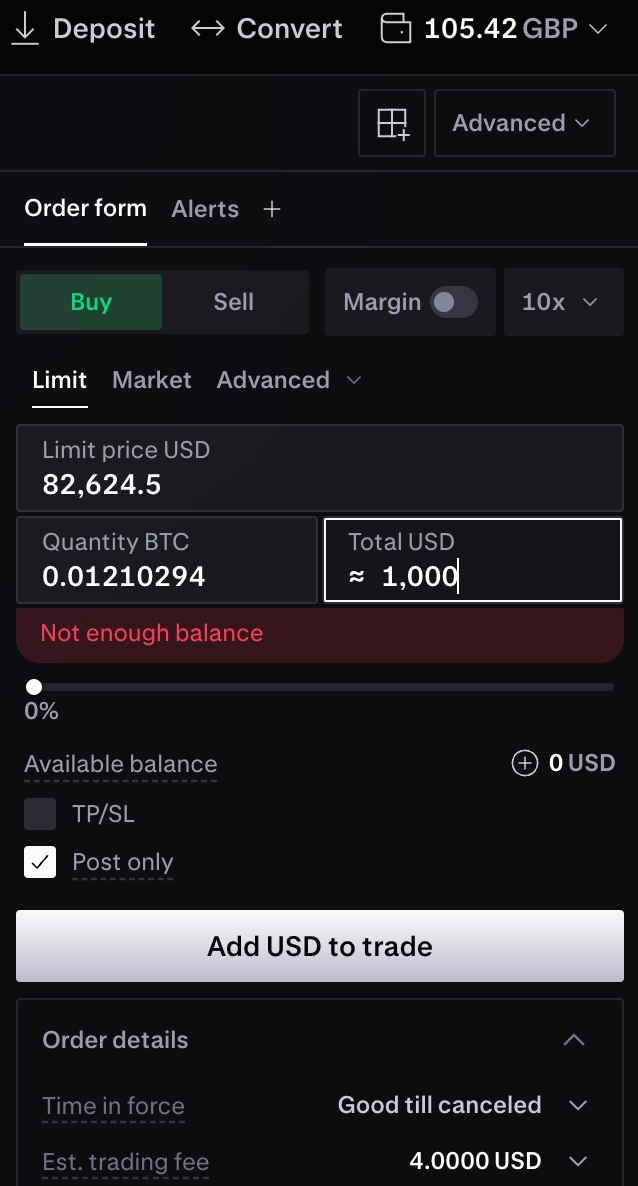
When I place limit orders on Kraken Pro, I select ‘Post only’ on the order form. Kraken says this ensures your order acts only as a maker, so you won’t be charged the taker rate by mistake. The downside is that a resting order might fill late, only partially, or not at all.
It’s also smart to think about round trips. If you buy and then sell $1,000 at Tier 1 taker rates, you’ll pay $16, or 1.6% of your position, before any price movement. If you use maker orders both times, that cost drops to $8.
Other Kraken Pro Costs
Stablecoin, pegged token, and FX pairs like USDC/USD or EUR/USD have their own fee schedule, starting at 0.20% for both makers and takers. This is better than Tier 1 crypto rates, but trading these pairs doesn’t help you move up the main tiers.
Pairs with USDG, like USDG/USD, cost 0.00% for makers and 0.01% for takers at the entry tier (at $100M+ in 30 days, the take fee drops to 0.001%). Margin trading adds two extra charges on top of the regular trading fee: an opening fee and a rollover fee every four hours.
Kraken’s margin table lists both fees as 0.01% to 0.02% for Bitcoin and 0.02% to 0.04% for most other assets. Forced liquidation costs 2%. Availability depends on your location and margin trading is high risk.
Kraken+ does not reduce any Kraken Pro fees. The $4.99/month or $49.99/year membership waives fees on app trades up to $10,000 a month, but Kraken’s fee schedule says it does not cover spot, futures, API, or OTC trades on Kraken Pro.
Deposit and withdrawal fees depend on your account, the method, and the currency. Helpfully, Kraken shows you the exact fee on the confirmation screen before you approve any transaction.
How To Keep Your Kraken Pro Fees Down
Here are the steps I follow for every Kraken Pro order, in the order I do them.
- Trade from ‘pro.kraken.com’ or the Kraken Pro mobile app with your usual Kraken login. ‘Instant Buy’ volume in the main app does not count toward your tier, so trades there won’t help lower your rate.
- Choose ‘Limit’ as the order type and check the ‘Est. Trading Fee’ line on the order form before submitting. Kraken calls this the estimated fee for your order.
- Set your buy price below the lowest sell order, or your sell price above the highest buy order, then turn on ‘Post only’. In the app, you can find this by sliding the order form up.
- For pairs that allow it, use the ‘Fee Currency’ option to pick which side of the pair pays the fee. By default, Kraken charges the fee in the quote currency, so for BTC/USD, that means dollars.
- If your tier is based on your holdings instead of trading, watch your balance. Kraken measures your assets in real time, so a withdrawal or a market drop can lower your tier immediately.
Is Kraken Pro Worth The Cost?
If you trade more than a few thousand dollars a month, Kraken Pro is worth it. From Tier 3 up, the taker fee is less than half the app’s 1% fee, and limit orders lower it even more. You can also reach Tier 3 just by holding $20,000 on Kraken, without trading.
For newcomers who only place the occasional market order, the difference is smaller than you might think: 0.80% versus 1%. In this case, switching to Kraken Pro only makes sense if you’re willing to use limit orders and wait for them to fill.
Our full Kraken review covers the platforms, funding, and safety record in more depth.