

How To Change Leverage On AvaTrade
You cannot change the leverage at AvaTrade. We tried to do it in our account but couldn’t; we then confirmed this wasn’t possible with the support team. Maximum leverage is preset with regulations. You can access higher leverage if you qualify for an AvaTrade professional account, but even that cannot be adjusted.
 Written By
Christian Harris
Christian is a seasoned analyst, leveraging his expertise in stocks, forex, and crypto to evaluate brokers worldwide. With hands-on trading experience and a strong focus on risk management, he helps traders find reliable platforms. Christian's work for BrokerListings.com has been cited in the Financial Times.
Christian Harris Profile Page Fact Checked By
Tobias Robinson
Tobias is committed to helping traders find the right brokerage for their needs. He has tested 200+ brokers, spent 2,600+ hours using different platforms, and placed 2,100+ trades.
Tobias Robinson Profile Page Edited By
James Barra
James is an experienced broker analyst with a background in financial services. He has spent 2,500+ hours testing brokers, used 35+ different platforms and apps, audited 120+ broker T&Cs, and verified 300+ regulatory licenses. James has also been on US and UK TV, and been a guest on finance podcasts, discussing reports conducted by BrokerListings.com and sharing his expertise.
James Barra Profile PageOctober 7, 2026
If you go to the AvaTrade homepage and enter your primary email and password, you can access your account dashboard. Once you are inside the main dashboard, if you look at the left-hand navigation panel and click the ‘My Accounts’ tab, it will display individual profile cards for all your active trading setups, including your MetaTrader platforms and proprietary web-trader accounts.
However, you may find (like we did), that you are unable to amend the level of leverage. Confused, we started a conversation with an AvaTrade agent on live chat, who after some back and forth, confirmed that you can’t change the leverage manually on any of AvaTrade’s products, i.e. CFDs, futures and options, regardless of location, live or demo account, or account level.
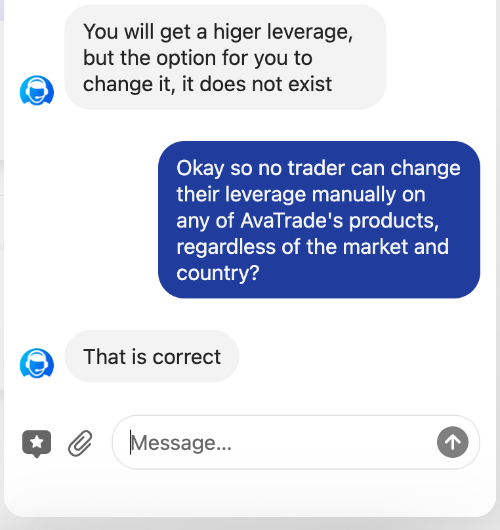
This means clients of AvaTrade will have to use a manual work-around. This is to open smaller trades relative to your balance. This effectively reduces your market exposure and requires you to hold more of your capital as free margin, so it’s like ‘lowering your leverage’.
Regulatory Boundaries
Because of rules from authorities such as the ESMA in Europe and ASIC in Australia, AvaTrade’s retail accounts are subject to caps on maximum leverage. Major forex pairs are limited to 1:30, and indices are capped at 1:20.
If you are a retail trader in these jurisdictions, you cannot simply click a button to slide your leverage higher. Your actual maximum leverage is fixed by wider regulations unless you qualify for a professional account status.
Upgrading To Professional Status
For retail traders locked under strict regional caps, the only way to access higher leverage, such as 1:400, is to apply for Professional Trader status. Go back to the left-hand menu in your account area and locate the tab labeled ‘Professional Trader’. Click this to open the formal application screen.
The platform will present you with a checklist of regulatory criteria. You need to meet two of the three specific requirements, including having a large financial asset portfolio, relevant professional experience in the financial sector, or a high volume of significant trades over the past year.
Check the boxes that apply to you, upload your supporting bank or broker statements using the upload button, and click submit to have the compliance team review them.
Just keep in mind that qualifying for professional status can also mean you lost certain safeguards, notably the provision of negative balance protection and standard risk warnings.