

Mobile Trading: The Hidden Issues That Could Be Costing Traders Money
 Written By
Christian Harris
Christian is a seasoned analyst, leveraging his expertise in stocks, forex, and crypto to evaluate brokers worldwide. With hands-on trading experience and a strong focus on risk management, he helps traders find reliable platforms. Christian's work for BrokerListings.com has been cited in the Financial Times.
Christian Harris Profile Page Fact Checked By
James Barra
James is an experienced broker analyst with a background in financial services. He has spent 2,500+ hours testing brokers, used 35+ different platforms and apps, audited 120+ broker T&Cs, and verified 300+ regulatory licenses. James has also been on US and UK TV, and been a guest on finance podcasts, discussing reports conducted by BrokerListings.com and sharing his expertise.
James Barra Profile PageApril 8, 2026
Retail investors, like the rest of the population, are increasingly turning to mobiles over fully-featured desktop devices, with mobile apps accounting for 53.2% of the US online trading platform market in 2025, compared to 46.8% on desktop. Yet we’re concerned that despite their convenience, this trend could be costing active traders in subtle ways.
So we headed to the app store and spent the next two days glued to our phone. What we found wasn’t a dramatic crash-and-burn story. It was quieter: minor delays, small frustrations, and tiny mistakes that didn’t feel like much in the moment, but added up fast.
Key Takeaways
- What we did: We logged every forex trade over 48 hours using only a phone during the London session and the London – New York overlap. All analysis, charting, entries, exits, and alerts were handled on the phone. The only variable changed from our regular routine was the device and interface.
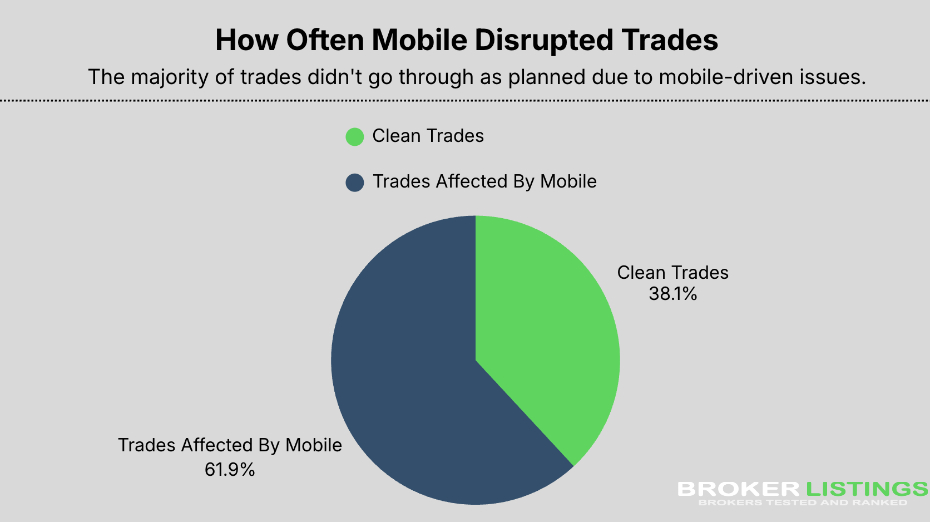
- What we found: Mobile-only execution causes subtle issues. We finished net negative, with 62% of trades directly impacted by mobile limitations. 3 trades that were missed entirely due to alert/app behavior, and only 8 trades played out exactly as planned. These weren’t market patterns or strategy flaws – they were interface and timing problems unique to phones:
-
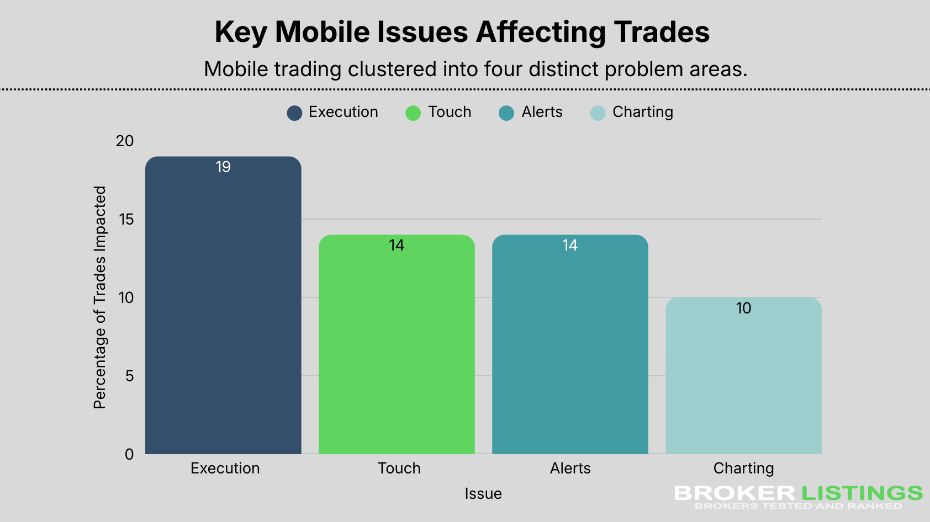
- Charting context got lost. Constant zooming, panning, and frame switching reduced reaction time and diluted awareness, especially during fast parts of the London – New York overlap.
- Order entry friction cost trades. Stop and limit placement mistakes happened more than a few times due to squeeze-in menus and small touch targets.
- Alerts were inconsistent. Notifications sometimes fired late, without price context, or not at all, resulting in missed or mistimed entries and exits.
- Execution lag mattered. During volatility, quotes and fills on mobile lagged desktop responsiveness, moving planned targets by the time orders were confirmed.
- Behavior shifted under mobile pressure. Frequent checks and reactionary taps led to overmanagement and emotional exits, even on trades that started well.
-
- How to protect yourself: You don’t have to avoid mobile entirely. But knowing where phones strain execution, like chart context, precise risk control, alerts, and confirmation timing, lets you decide when mobile trading is appropriate and when it isn’t.
How We Ran This Test
- Timeframe: 48 consecutive market hours covering the London session and the London-New York overlap
- Market: Spot forex only – no CFDs, stocks, commodities, indices, or crypto
- Pairs: EUR/USD, GBP/USD, USD/JPY
- The Rules: Every single trade was planned, entered, adjusted, and closed on our phone. Zero desktop use. Zero tablet. Zero external charts.
- Platforms: We used 3 major retail forex broker apps and kept them anonymous – this wasn’t about naming names, just testing the reality of mobile execution.
- Strategy: We didn’t change our approach, position sizing, or risk management. The only variable was the device.
- Logging: We recorded every trade immediately after execution, noting execution quality, alert behavior, chart issues, and any issues we felt in real time.
- Goal: See how mobile-only trading affects trade quality, timing, and decision making during actual market conditions – not to rank brokers or test strategies.
Why We Did This
Mobile trading looks incredible in marketing. Clean interfaces. Trade from your couch. Big friendly buttons. For anyone getting into trading, it’s the promise: trade whenever, wherever.
But we’re skeptical because we know the challenges of actively trading. So we wanted to see what the marketing means when you’re actually in the hot seat – analyzing the markets and trying to capitalize on trading opportunities.
Our rule was simple: if we couldn’t do it on the phone, it didn’t happen. No checking desktop charts to verify. No placing orders on our laptop because it’s easier. Everything had to go through that small screen.
What We Were Working With
A mid-range smartphone, nothing fancy. Home Wi-Fi with mobile data as backup. We rotated between 3 popular broker apps to keep it fair. There was no point calling out particular platforms when the issues were universal.
The moment we started, we noticed things. Fewer indicators fit on the screen. Charts felt cramped. Everything was buried two menus deep.
None of that appeared like a big deal until the market started moving.
Trade Log
Here’s exactly what went wrong and when:
« Make Full Width »| Pair | Direction | Entry Type | Planned Stop | Actual Stop | Result | Mobile Issue Observed |
|---|---|---|---|---|---|---|
| EUR/USD | Long | Limit | 12 pips | 12 pips | Win | None |
| GBP/USD | Short | Market | 15 pips | 9 pips | Loss | Stop mis-tap |
| EUR/USD | Long | Limit | 10 pips | 10 pips | Win | Chart zoom delay |
| USD/JPY | Short | Market | 12 pips | 12 pips | Loss | Late fill |
| GBP/USD | Long | Limit | 14 pips | — | Missed | Alert arrived late |
| EUR/USD | Short | Market | 10 pips | 10 pips | Loss | Quote lag |
| EUR/USD | Long | Limit | 11 pips | 6 pips | Loss | Accidental stop change |
| GBP/USD | Short | Limit | 13 pips | 13 pips | Win | None |
| USD/JPY | Long | Market | 10 pips | 10 pips | Loss | Execution delay |
| EUR/USD | Short | Limit | 12 pips | — | Missed | Alert arrived late |
| EUR/USD | Long | Market | 9 pips | 9 pips | Win | None |
| GBP/USD | Short | Limit | 15 pips | 15 pips | Loss | Chart compression |
| EUR/USD | Long | Market | 10 pips | 10 pips | Loss | Overmanagement |
| USD/JPY | Short | Limit | 12 pips | 12 pips | Win | None |
| EUR/USD | Long | Limit | 11 pips | 11 pips | Win | None |
| GBP/USD | Long | Market | 14 pips | 8 pips | Loss | Fat-finger stop |
| EUR/USD | Short | Limit | 10 pips | — | Missed | Alert arrived late |
| USD/JPY | Long | Market | 9 pips | 9 pips | Loss | Late confirmation |
| GBP/USD | Short | Limit | 13 pips | 13 pips | Win | None |
| EUR/USD | Long | Market | 10 pips | 10 pips | Win | None |
| EUR/USD | Short | Market | 12 pips | 10 pips | Loss | Emotional exit |
The Numbers After 48 Hours
- 21 total trades:
- 8 winners
- 10 losers
- Net result: lost money
Over 60% of our execution problems stemmed from the mobile interface, not misreading the market. The most significant damage came from:
- Execution delays at volatile opens
- Stop placement mistakes due to touch
- Late or missing market alerts
- Lost context from constant chart zooming
Key Challenges Caused By Trading On Mobile
1. When Less Screen Means Less Clarity
On our desktop setup, we can see everything at once. Key levels stay visible. Multiple timeframes sit side by side. We don’t have to think about it.
On the phone, it was constant zooming. Pinching in to mark a level, zooming out to see the bigger picture, switching timeframes, redrawing everything, then doing it all over again.
During the London session, this actually cost us entries. Not just once – repeatedly.
We’d spot a clean pullback on the 5-minute chart. Switch to the 15-minute to confirm the structure. The level looked different. Switch back – now the candles were compressed differently. We hesitated. Price moved without us.
The patterns were still there. But the context kept slipping away whenever we tried to zoom or scroll.
We spent more time fighting with the chart than managing trades.
2. Where Things Got Expensive
This is where we started taking real losses.
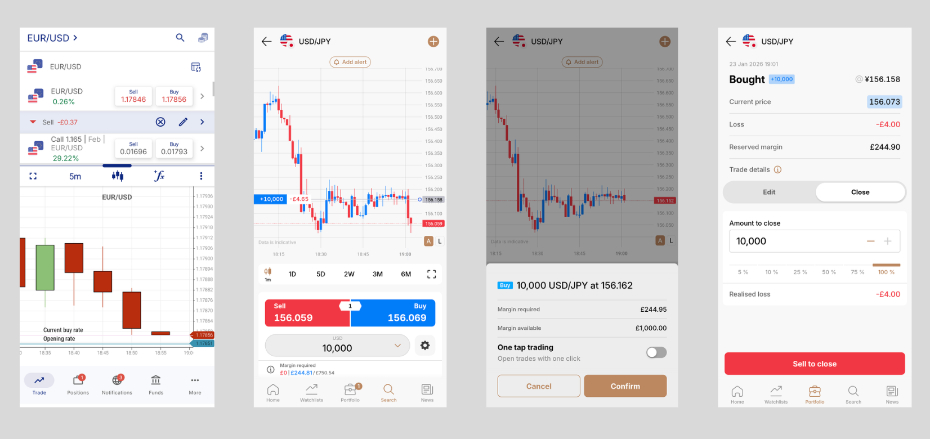
Order tickets on mobile hide information until you’re almost done. Your stop-loss and take-profit fields overlap. One misplaced tap changes your risk, and you might not notice until it’s too late.
On one EUR/USD trade, we inadvertently set our stop too tight. Not because we changed our mind – because our thumb slipped.
It got stopped out on normal noise. The trade went on to work perfectly… without us.
More of our losses came from stop placement errors than bad trade ideas.
Market orders executed quickly enough. But setting up limit orders took extra steps. During fast London moves, those extra seconds mattered more than we expected.
3. When Timing Actually Matters
During the quiet Asian session rollover, mobile execution felt totally fine.
But during the London open and the New York overlap, it was a different story.
Quotes would freeze for a second. Charts lagged just slightly behind. Order confirmations took that extra beat to show up.
A few seconds doesn’t sound like much. In forex, it can be a big deal.
We saw price hit our exact entry level, tapped to get in, and got filled 3-4 pips worse. Not slippage from the broker, just that tiny delay between our tap and the confirmation.
By the time our order went through, the trade we’d planned no longer existed.
4. Unreliable Alerts When You Need Them Most
The alerts either fired late or didn’t fire at all. When they did come through, half the time they didn’t show us the actual price.
We completely missed a GBP/USD setup during the London – New York overlap because the alert arrived after the price had already blown through our level. By the time we opened the app, the opportunity was gone.
Background apps get throttled to save battery. Our notifications went quiet at the wrong moments.
7 entries were either missed or badly timed solely because of alert problems.
5. The Physical Toll Nobody Talks About
After a full London session staring at a small screen, our eyes were burning.
The glare forced us to hold the phone at odd angles. Our hands got tired from gripping it during longer monitoring stretches. We started making sloppy taps from basic fatigue.
2 losing trades came down to simple mis-taps. Not emotion. Not panic. Just tired fingers on a glass screen.
2 trades lost to fat-finger errors, not market direction.
How Our Trading Actually Changed
This caught us off guard more than anything else. We started checking our positions constantly, every couple of minutes. The phone makes it too easy because it’s right there in your hand.
That led to cutting winners early, micromanaging everything, and reacting to every small wiggle instead of letting trades breathe.
On a desktop, there’s natural friction that slows us down. We have to choose to check actively. On mobile, that challenge disappears. Speed works both ways.
We checked our open trades nearly 3 times as often as we usually would.
What Mobile Actually Does Well
Mobile trading isn’t broken – it just has clear limits, especially for active traders. Over those 48 hours, a few things worked well across all the apps we used.
Checking positions was effortless. One tap and we could see our open trades, spreads, unrealized P&L, and margin levels – all right there.
Closing trades during calm markets was smooth. Outside of major session opens, exits happened quickly with no noticeable lag.
Being away from our desk didn’t mean ignoring trades. We could make adjustments when needed, which gave us the flexibility we wouldn’t have had otherwise.
As a support tool, mobile delivers. For managing existing positions, emergency exits, or checking your exposure, the phone works as it should.
The issue wasn’t access. It was precision. Problems surfaced when we needed speed, accuracy, and context simultaneously.
Mobile trading works best as a companion, not a command center.
What You Should Know Before Trading on Your Phone
Mobile trading isn’t simpler. It just feels easier. The costs hide in places you don’t expect:
- An alert that arrives too late
- A stop you placed incorrectly because you tapped the wrong spot
- A fill that comes through after the price moved
None of these feels dramatic when they happen. But together, they matter.
The tool you use shapes how you trade. How you trade shapes your results. That’s the part the broker conveniently skips over.
Bottom Line
This wasn’t about proving mobile trading is terrible. It is not.
It is about understanding what changes when your screen gets smaller, but your risk stays the same.
For those committed to short-term forex trading, that difference is expensive. We learned that the hard way, and now you do not have to.
Disclaimers
- This article is for informational purposes only. It documents a personal trading experiment and observations from live market conditions. It was not written to guide decisions or tell anyone how to trade.
- Nothing in the article is a recommendation or signal. Trade examples were included to show how mobile execution affected outcomes, not to suggest entries, exits, or strategies.
- Results reflected a short, controlled test period. The findings came from a 48-hour window covering specific market sessions. Different timeframes, conditions, or trader behavior could have led to different outcomes.
- Performance outcomes were not typical or predictive. Gains or losses described were tied to one trader, one setup, and one constraint (phone-only execution). They were not presented as expected results.
- Forex trading involves risk and drawdowns. Prices move quickly, leverage magnifies outcomes, and losses can occur even with planning. This experiment did not reduce or remove those risks.
- Platforms and tools were discussed in context, not ranked. Any mentions of apps or features were observational. They were included to explain execution friction, not to promote or criticize specific providers.
- Opinions reflected conditions at the time of testing. Platform interfaces, app performance, and market behavior could change. Observations might not have applied under different updates or environments.